
HDF5: Storing CFD data the correct way
In this article, we take a deep dive into the HDF5 file format and see how we can use it to read and write data that we would typically collect during a CFD simulation.
The best part about HDF5 is that it is really easy to learn. It has a very clear design philosophy, which you'll instantly understand. Mapping that to HDF5's API is also not a huge mental effort, and I can guarantee you that, by the end of this article, you'll know not just simple, but also advanced techniques to write HDF5 files, which likely cover most, if not all, of your use cases.
In the process, we will look at what the HDF5 file is, how we write to it, how we read from it, as well as how to use a wrapper library called HighFive, which makes all of that a lot easier for us if we are using C++ anyway.
If you are writing any kind of scientific application, especially CFD solvers, HDF5 should be your friend and take care of all of your data input and output operations (I/O). We'll also explore how we can read HDF5 files directly into Paraview, so we don't just treat them as containers to store data, but rather as a useful exchange format to bring our simulation results to life in a post-processor.
Of course, HDF5 isn't perfect, and we'll look at some of its flaws as well. There is no proposed solution that is beyond this article (I have no plans on infiltrating the HDF steering group and morphing the file format standard in a way that suites my agenda). Let's call it an intervention and hope that HDF5 will come to its senses, eventually ...
In this series
[custom_category_posts_list category_slug="essential-libraries-for-cfd-solver-development"]In this article
- In this series
- In this article
- Introduction
- Introducing the HDF5 format
- HDF5 code examples
- Writing mesh
- Writing solution data
- Linking mesh and solution files
- Interlude: How can I inspect my HDF5 files
- Adding attributes to datasets (primitive types)
- Adding attributes to datasets (compound types)
- Interfacing with post-processors: Reading HDF5 files in Paraview
- Creating restart files
- Finally, the syntax makes sense: HighFive, the wrapper library
- Summary
Introduction
The year is 2013, and spring is in full swing. Gone were the last traces of snow, which, inexplicably, fell that year in April, a rather strange occurrence for the East Midlands (UK). Here I was, full of excitement to start working on my MSc thesis project.
The project I chose was the creation of a lattice Boltzmann solver from scratch. In many ways, that was the point where I decided that writing CFD solvers is what I want to do, and this website likely would not have existed without this exposure.
I was working on that project together with a fellow student, who, after recently checking in with me, is currently obsessed with becoming a professional tennis player in his 40s, while planning to put all of his investments into parking lots. That is a sensible man, with a sound business strategy, and you thought I was strange.
Gennaro, the Italian, who I nicknamed Genitalia (a nickname he was never fond of, for some reason, and, for that matter, none of his family members when I came up with that name in front of his whole family at Graduation day ...), had a friendly competition going who could finish the solver first.
Well, he won, maybe because he actually implemented a lattice Boltzmann solver, while I was busy fine running my mesh reading code. For some reason, I decided that I would support the reading of unstructured grids, which I would then, internally, convert to a structured (Cartesian) grid. Why? No idea, I suppose I was hevily leaning into this whole solver development journey and wanted native mesh reading support, even though one of the reasons we like to use lattice Boltzmann is that we essentially do not need a mesh ...
Be that as it may, while I was busy re-inventing CFD solver development standards, and Genitalia was writing a solver that had no performance (ultimately my solver was faster, believe it or not), we came up with two messy code bases that showed we were first-time C++ programmers. We used object-oriented programming, but our objects were pointless, much like compiling C code with a C++ compiler and then claiming it is C++.
In any case, fast forward one year, I was now busy teaching my PhD supervisor what the Runge Kutta method is and how to implement it while Genitalia moved south, to Madrid, but being send to Germany to work, meaning he was receiving his base pay for Spain but had to pay taxes in Germany, the worst of both worlds.
I am not sure who won this round ...
But, at the same time, another two victims approach the topic of extending our lattice Bolzmann solvers with parallel computing. They were given both solvers and then asked to pick one. I remember seeing their MSc thesis at some point, where they made a comparison between both Gennaro's and my solver.
For my solver, they said something along the lines of "this is a very complex solver that may not be ideal for writing a parallelisation layer on top". Reading between the lines, they may as well have written "WTF is this?". They were not wrong.
Let's call them the Hungarians, Matt and Támas. These are not the correct spellings of their names. Matt must have given up at some point and just adopted the more western spelling of his name, while Tamas keeps sending email to remind everyone about the proper spelling. For that reason, I have misspelt his name on purpose (the kind of stuff that gets his blood boiling, and I know he reads this website every now and then; let this be a surprise for him when he does reach this paragraph ...)
In any case, because I was just a stone's throw away in London at that time, I kept in touch and did meet with Matt and Tamás (yes, I know the correct spelling ...), who had to comb through the codebase. I must have apologised to them for the mess when I first met them. In any case, we got on well, and these days, I work together with Tamas (let's settle on this spelling), while Matt has ventured off into the unknowns (the US). Well, the west has peaked at Slough; anything beyond is just geographical padding.
Matt ended up at Virginia Tech, and he focused more on the experimental side of fluid mechanics. They were working on exploring a novel concept to dampen pressure oscillations and thus reduce noise, which targeted aerospace applications. They had a bunch of experimental work done, but though, it would be good to get some numerical input as well.
So, Matt and me got together and started to work on this. I did some Large-Eddy Simulations at Cranfield, while Matt provided experimental data and essentially all of the post-processing pipeline. One of the things we wanted to investigate was the turbulent statistics on specific planes.
Since I was able to collect flow field information at sampling rates no experimental instrumentation could provide, I collected velocity and pressure data on 3 separate planes at a sample rate of 10kHz for a duration of 2 seconds. That was the easy part.
Before we started, I knew there was going to be a lot of data that would be generated, but I never really thought about how to then transfer that data from the UK to the US. I don't remember the exact size, but I think the generated data was around 500 GB of data. Not something you would send via pigeon post ...
So, I looked into reducing the file size so as to make the transfer via upload a tad simpler. And this is how I got introduced to HDF5. To be fair, I was conceptually aware of HDF5 for some time by then (thanks to CGNS), but never actually used it myself, only by through consuming files that were based on HDF5.
So I got to work and wrote a converter tool that would take my generated simulation files and store them in HDF5 file format. When I first used HDF5, I was surprised how such a large and complex library was so simple to use. I can guarantee you that if you read through the end of this article, you will walk away and be able to simple drop HDF5 into any code you work with, without performing complex brain arithmetic to force your application around HDF5.
Introducing the HDF5 format
So then, what is the Hierarchical Data Format (HDF5)? In the year 1987 (yes, there is some history here, strap in), the Graphics Foundations Task Force (they had a task force!) at the National Center for Supercomputing Applications (NCSA) at the University of Illinois at Urbana-Champaign was determined to create a new file-sharing format that would allow scientists to share scientific data easily across different computer architectures.
This task force eventually developed into a non-profit company, which these days operates under The HDF Group handle. Who would have thought that you can run a business by just inventing a fancy new zip archive format ...
At its core, HDF5 is just that, some magical container in which you can store stuff. And by stuff, I mean literally anything that can be stored digitally (spreadsheets, PDFs, raw numerical data, etc.). And, just like a zip archive, which can compress a folder structure and retain it, data inside an HDF5 file is stored with a specific path.
Think of this analogy: If you insert a USB stick, or external hard-drive into your PC/laptop, you are able to store files on it and organise them into folders. An HDF5 file is essentially that USB stick or external hard drive. To reduce the file size, HDF5 is written in binary and, on top of that, compressed, reducing file sizes by a few factors compared to alternative approaches. For that reason, you are seeing HDF5 being used everywhere where data needs to be stored efficienctly.
HDF5 also allows you to annotate your data, for example, you may want to store the flow solution of the pressure inside your HDF5 file, along with its units (e.g. Pa, mbar, etc.). HDF5 lets you do that.
The core library is written in C, which is a fairly typical choice for a library that seeks widespread adoption. C integrates well with any other language, and for that reason we often see C used over C++ for library development (unless we want to exploit specific features of C++ and are happy to be locked in, as for example Eigen), where we gain efficient matrix and vector operations at the cost of using C++ specific features (like tempaltes) that are not available in other languages.
As with any software project that has been going strong for decades, there are inevitably issues (or, more specifically, technical debt) that accumulate over the years/decades.
One of the things that drives me nuts is the versioning of HDF5. As the name suggests, there also are HDF4 and previous versions, which are not compatible (so far so good; that is what a major version change communicates). But when you download HDF5, you do get a second version. For ages, we used to have HDF5, version 1.14.x. Why was that not version 5.14.x?
Even worse, the versioning is wrong. There are clear rules for how to version software, and HDF5 is breaking seemingly all of them. Whenever you see a version like 1.14.9, i.e. 3 digits, then we talk about Semantic Versioning. Each number has a specific name, and we write the number as MAJOR.MINOR.PATCH. Here, each number has a specific meaning:
- MAJOR: A change in the major version indicates that backwards breaking changes have taken place. A function that was called
upwind()in one release, which is then renamed tofirstOrderUpwind()requires incrementing the MAJOR version. This is done so that anyone using the library understands that their code, which is depending on this library, may no longer work correctly. Perhaps that code was not using theupwind()method, so things would still work, but a change in MAJOR means "Watch out, we may have broken your code" - MINOR: We bump the MINOR version if we introduce a new feature, a new functionality, somethign new the library can do, without breaking any existing interfaces. So someone making use of your library will be able to still use the same functionality as before, even if you add more stuff to your library.
- PATCH: These are reserved for fixes. A change in PATCH indicates you have fixed some broken code (e.g. a bug), but you haven't actually introduced any new functionality
This is a broad overview. You can then also add additional handles like alpha or beta, to indicate this version is now getting ready for release and is currently in user acceptance testing. What you should never do is to bump your MAJOR version each time you have a new release ...
Now, let's indulge ourselves in the following paragraph, taken directly from the HDF5 documentation:
As part of the latest HDF5 release, several functions that existed in previous versions of the library were updated with new calling parameters and given new names. The updated versions of the functions have a number (for, e.g., '2') at the end of the original function name. The original versions of these functions were retained and renamed to have an earlier number (for, e.g., '1') at the end of the original function name.
The documentation then follows that up with an example for the function call to H5Lvisit(). Where we originally had just one function call, we now have 3: H5Lvisit1(), H5Lvisit2(), and H5Lvisit(). The last function will call whatever function it believes to be correct on your behalf (e.g. version 1 or 2). This isn't great.
Also, can we just step back for a second and admire the sheer stupidity that is unfolding right in front of our eyes? We are talking about HDF5 (version 5 of the HDF file format), the library is in version 1.x.x, while the functions exist simultaneously in version 1 and 2. Three separate version conventions. This is what happens if you allow scientists with no formal computer science background to write code. Well done!
And, as an aside, since we do have version 1 and 2, as well as a function that may call either one of them (we only know once we call the function), we have implemented Schrödinger's cat into code. I don't know about you, but quantum uncertainty is not what I look for in my library interfaces. I like deterministic ABI compatibility, and I know that I am likely the only one who cares about it ...
Second note: the version-breaking changes were introduced between versions 1.6.x and 1.8.x. What happened to version 1.7.x?
But I have a fix for you, and it will come at the end of this article in the form of a wrapper library (HighFive). First, we will go through the pain of creating all HDF5 files ourselves, using the somewhat broken C API, and then we will look at how wrapper libraries like HighFive make our life considerably easier.
But, for now, let us have a look at the structure of any HDF5 file and how to inspect them, and then move on to write example HDF5 files we would find in CFD applications.
The structure of an HDF5 file
The HDF5 file structure is actually a very simple one. You can create a path (like a folder path on your hard-disk), which in HDF5 terminology is called a group, and you can store data in that particular location. Everything is stored in binary, meaning your data is reduced in size.
For large data, this means you can save significantly in storage space, and certainly, back in 1987 when the HDF file format was born, storage size was a big concern. We have to trade compact storage size for convenience here, i.e. we get smaller file sizes but, in order to read these files, we need to use the HDF5 library to extract the information we want again.
It is not a big issue, though; we make this trade-off all the time with zip files as well.
Where HDF5 gives us some additional goodies on top is when it comes to compression. It allows us to compress data while writing, reducing storage size further, and we are able to write in parallel to the same file, providing a huge performance boost for parallel CFD codes.
The parallel performance boost, in particular, is one of the reasons people like to use HDF5. In the end, if you just need to output your results for your 1D linear advection solver code, you wouldn't go for HDF5, much in the same way you wouldn't write a TODO app for your phone if you want to write down your grocery list (a piece of paper will probably do, or even just a note-taking app on your phone).
But, if you are running a simulation on a cluster where you have, say, 10,000 cores that run your code in parallel, would you want all processors to send their data back to the master core, which then stores the result one by one? What you have just done is create a massive bottleneck, wrecking your I/O pipeline.
This example is especially useful as it highlights two separate problems, both of which are addressed elegantly by HDF5. Let's look at both problems. Let's say you have a smaller job of only 16 cores and you want to write the results to an HDF5 file. In that case, what you can do is compute the offset in the dataspace between processors.
For example, let's say that the first processor has 52,021 datapoints to write, while the second processor has 47,881 elements to write. We tell HDF5 in advance that it can expect data starting at memory location 0 and then going up to 52,020 for the first processor, and then starting at memory location 52,021 and going to 99,901 for the second processor, and so on. In this way, memory is reserved for different processors, which can write their content directly to the file.
Have you spotted the issue here?
This works if all data lives within the same shared memory (RAM or your L3 cache). If we go back to our 10,000-core example, we likely are running this on a super computer across several compute nodes, so the data isn't available for writing as we compute.
We could, of course, send data again between cores, but that would slow down our parallel I/O again as we are still just using a single core to do all of the memory writing. Instead, HDF5 supports the notion of links, where we can create some data and provide a location that is outside of the current file. In this way, each processor can write their own data locally, and then, once all HDF5 files are copied back to the main node, all links will be resolved.
Since this happens after the computation is done, and memory transfers on supercomputers are relatively fast using InfiniBand or similar high-performance memory transfers, this step is usually done relatively quickly, and it doesn't hold up the computation.
Let's look at a concrete example, one that we will implement later as well in HDF5:

Here, we see a schematic of an HDF5 file. On the left, we see the simulation.h5 file, and we see that we use thr *.h5 file extension to denote a file as an HDF5 file.
We have the root node, which is typically represented by /. Then, we see that we have two additional nodes under the root, one for holding the mesh, and one for holding the solution. The solution is further subdivided into different timesteps, in case we want to store data for several time steps.
We see that we store the x, y, and zcoordinates under the mesh node, and I have shown here as an example that we simply store an array here of numbers that represent the x coordinate array. The same holds for y and z, which I have not shown to keep the figure clean.
If you now wanted to read, for example, the x coordinate array from the HDF5 file, you need to know where it is stored. We can see that from the groups directly, i.e. the coordinate is stored at /mesh/x. Remember, the root is just /. Equally, we can get /mesh/y and /mesh/z as coordinates.
On the solution side, I have shown that we may have defined the groups for the velocity components u, v, and w, as well as the pressure p, but the actual data is not stored within the simulation.h5. This data is, instead, stored in the data.h5 file, and we link between the two files using HDF5's linking capabilities.
There are three reasons we do that:
- Parallel I/O performance, as already discussed above
- For runs containing a lot of data in time, we get large file sizes that may be difficult to read in one go without running out of memory. Using links means we can read the base file without issues and then only pull in the data that is currently required.
- By separating the mesh and solution array, we store the mesh only once and store the solution always without any meshing data, so as to avoid storing the mesh again every time we store the solution. We only need it once; as long as it is not changing, the solution does not need to write the mesh again.
Let's now also look at the data itself. In our simulation.h5 example file, I provided the data for x as . We cannot simply store that data; we need to tell HDF5 a few additional things like:
- the dimensionality of the array (1D, 2D, 3D, ... ND)
- the number of elements
- the element type
With that information, HDF5 is able to compute the total required space, which it then allocates for us. We need to provide this information beforehand, and, in my view, this is where the native C-API is somewhat cumbersome to navigate, as we have to do a lot of setup before we can even write the simplest of data arrays. This is where wrapper libraries like HighFive will make our lives a lot easier.
The C-API does actually follow some neat naming convention (as neat as a C-API can get (all things C++ improved upon)). For example, all calls start with H5. The next letter describes the operation. For example, we may have these two functions: H5Fcreate() and H5Gcreate(). The only difference is the letters F and G here. A list of what these letters refer to is given below:
- H5A: Attribute interface
- H5D: Dataset interface
- H5E: Error interface
- H5F: File interface
- H5G: Group interface
- H5I: Identifiers interface
- H5L: Link interface
- H5O: Object interface
- H5P: Property interface
- H5PL: Plugin interface
- H5R: Reference interface
- H5S: Dataspace interface
- H5T: Datatype interface
- H5Z: Filters and compression interface
So, in our example, we can reason that H5Fcreate() will create a new HDF5 file (which it does), while H5Gcreate() will create a new group within an HDF5 file that is currently open. We can also see where to find additional information about specific interfaces. For example, if we wanted to know how to create links, we could look up the documentation for the H5L interface.
Use this documentation for the high-level API calls of HDF5. If you just search for HDF5 documentation on google, you'll get countless links, all pointing to some part of the documentation, potentially old and outdated one. The one provided here should be up to date.
You can then link through to any of these interface functions, and you are given a list of all the available functions. For example, if you went to the H5Fcreate() function definition, you get the function name, signature (i.e. which arguments it expects), a purpose, a description, and the parameter section, which tells you what each of these parameters needs to be.
In a lot of cases, you will find that only 1 or 2 of the parameters are actually required. If you do not care about some options that you can set when calling a function, you can use the H5P_DEFAULT argument, which tells HDF5 that it can do whatever it wants here.
This is fine in theory, but also means that you have code with a lot of H5P_DEFAULT parameters, and keeping an overview of what defaults you are setting here becomes challenging to remember. Other software solves this issue far better than HDF5, and, in fact, we will fix it ourselves later by using a wrapper library around HDF5.
For example, a common approach is to set defaults regardless and only ask for absolutely essential information in function calls (for example, the file name). Then, options can be set by calling a function like setOption() or something similar.
PETSc, another library we will eventually look at in this series, does use this approach, but also offers the user the option not to set any options at all. Instead, all options can be supplied as command-line arguments, making it easy to change options at runtime, without having to recompile the code. Not necessarily good for production, but for testing, this is brilliant. I never thought I had anything positive to say about PETSc, but apparently they have nailed this design decision at least!
OK, there are a few more things we should probably know before we get started, but honestly, these are likely best explained with code directly. So, before I write a complete but needlessly complex introduction, let us look at some code instead. (Though, if you prefer the needlessly complex introduction, go through the HDF5 documentation where you will find that).
HDF5 code examples
In this section, we will look at typical scenarios where you would use HDF5 in your CFD code. I'd argue that what we are seeing here is likely the most common use case for HDF5 in CFD (and, for that matter, in other scientific simulation tools).
If you want to run these code snippets, you need, well, HDF5 installed on your machine. I have left detailed instructions for how to get up and running in the code root folder (README.md), where you can find installation instructions.
I have left the dependencies lean; most examples only need HDF5, in one case, we need HighFive as an additional dependency, though this is a header-only library and does not need any additional setup steps, apart from downloading and extracting the library into the right folder.
I was tinkering with an HDF5 parallel example as well. I may add it in the future, but at the time of writing, there was no satisfactory way of getting HDF5 in parallel to work (on Windows anyway). HDF5 works well with MPI and supports parallel I/O (in fact, that is one of the main reasons we use it in CFD, at least for general-purpose CFD solvers).
If your answer is just use linux/macOS, mate, then you have been living life on easy mode for far too long and gotten too comfortable. Spice it up a bit and compile a dynamically linked library in debug mode once yourself, from scratch, and make the linking work ... you'll appreciate the comfy lifestyle your UNIX kernel gives you (I am not kidding).
Those who were on my email list when this website started may remember my mental breakdown I suffered thanks to Microsoft's design failosophy when it comes to dynamic libraries and runtime linkage. Let's not collectively live through that again; I have enough PTSD already ...
This article should feel more like a relaxing walk through the park than a visit to your Korean dentist who casually informs you, in fragile English, that your wife wants your wisdom teeth removed, so I'll take care of that now, while you're already lying immobilised in their chair. Even if you could speak, you realise that your Korean isn't good enough to object anyway. Just me?
He also told me Übung macht den Meister, in equally fragile German. Perhaps not something you want to hear from your dentist ...
Writing mesh
Let's start with a simple and relaxed example. The example shows how to write mesh data to an HDF5 file. This introductory example shall explain how we write native C++ data types into an HDF5 file. What we see in this example covers already 50-80% of all of your use cases, depending on how many advanced features you are planning to use. As I have said before, HDF5 is not complicated to learn; the C API just makes it sometimes somewhat frustrating, and we will see that in this example already.
First we need to include the library itself. We do that in style as follows:
1 2 | #include <hdf5.h> #include <array> |
It would have been sufficient to write #include "hdf5.h" here, in fact, that would have been the correct way of doing things (<> should be reserved for system libraries, but that isn't holding any library developer back it seems). We are eccentric, too, so we use angle brackets. This will annoy the hardcore C++ user base. I never got an invite, so I keep using <> ...
I am also including here the array class, as this is how I will store the mesh later, which will then be written to the HDF5 file. Next, we start the main() function, which I will skip for now, and concentrate on the code that is inside the main function. First, we define a constant, fixed-size mesh array:
1 | std::array<double, 5> x{0, 0.25, 0.5, 0.75, 1.0}; |
To be clear, I could have also used a dynamic-sized std::vector here (and I probably would use that in reality, as the std::array requires me to know the mesh size at compile time (here, I state that I have 5 entries)). It would not change any of the code that is to follow and deals with getting this data into the HDF5 file.
OK, are you ready? Our first HDF5 function is coming:
1 | hid_t file_id = H5Fcreate("mesh.h5", H5F_ACC_TRUNC, H5P_DEFAULT, H5P_DEFAULT); |
Let's see if we can remember what we talked about yesterday (well, that is when I was writing about it anyway; for you, it may have been 2 minutes ago). We use a function here with the F namespace, which stands for file, so, we create an HDF5 file.
The first argument is the filename (so far, so good); the second argument, well, I am already getting somewhat lost here. So, let's head over to the API documentation for the H5Fcreate() function, which tells us:
H5FACCTRUNC: Truncate file, if it already exists, erasing all data previously stored in the file.
I generally find code documentation confusing. I don't know what it is, but reading this just irritates me, just like others get irritated by my liberal <> usage. To truncate, to me, means to make something shorter. So, when I create a file that does not exist, what does truncate mean here?
OK, if it does exist, I suppose you could argue that you erase the file and recreate it, a process which will make the file size shorter. But if you use that logic, then I suppose my grandparents truncated 20 years ago. Does that make sense? No, I would need to give you the context that they moved from a large 3-story house to a 1-story apartment, reducing the living (and cleaning) space considerably. If HDF5 defines truncation this way, then we need to update the thesaurus and associate truncating with downsizing.
Because I just don't know when to stop, I looked at current related words for downsizing and, based on that, I present you with my three alternatives, which I intend to submit to the HDF5 working group (which will have the added effect of breaking backwards compatibility). But don't you worry, I have thought of that as well and will introduce my own versioning so that there is no confusion! Here are my suggestions:
H5F_ACC_REDH5F_ACC_DIETH5F_ACC_ENLARGEMENT
The first one is obvious, no? RED = reduction. I mean, we have already established that misleading nomenclature is the goal. Diet, sure, related, borrowed from a completely different group of words, but it'll do. The last one is actually an antonym, but somehow that may be the best fit.
Expect these changes in in HDF6 version 3.14 In H5Fcreate7() (but not H5Fcreate1() through H5Fcreate6(), we are not crazy), flavour: cocoslap.
OK, that was the second argument; what about the third and fourth arguments? I have simply used H5P_DEFAULT here, and as I already mentioned previously, this is a common (anti) pattern that we will see emerge in all of the code examples. I can never remember what these arguments stand for and so need to use the documentation.
Let's look at the documentation again for help (or to shorten our life expectancy). The third argument is defined:
hidt fcplid IN: File creation property list identifier, used when modifying default file meta-data. Use H5P_DEFAULT to specify default file creation properties.
And, the fourth argument is defined as:
hidt faplid IN: File access property list identifier. If parallel file access is desired, this is a collective call according to the communicator stored in the faplid. Use H5PDEFAULT for default file access properties.
The problem I have here is that this isn't very descriptive, which is fine. But it also does not follow up with a link for what I can use instead of H5P_DEFAULT. The documentation is doing its own lazy regression to the mean by telling us to simply use H5P_DEFAULT, because telling you what else can do here would take effort.
The third one we can actually safely ignore; the fourth one, unfortunately, not. Later, if we want to add parallel support, we need to add the communication handler here (e.g. if you are familiar with MPI, think of it as passing MPICOMMWORLD here in a form HDF5 can understand).
Good, we got through the first function. Are you ready for the next? Thankfully, that one is much more straightforward.
1 | hid_t group_mesh = H5Gcreate(file_id, "/mesh", H5P_DEFAULT, H5P_DEFAULT, H5P_DEFAULT); |
The H5Gcreate(), as we have discussed before as well, will start to create the internal path structure in the file, so everything is neatly organised into its own path. Let's see: the first argument is the file to which we want to write. The file_id variable was returned to us when we created the HDF5 file in the H5Fcreate() function call. We used it here to specify in which file we want to create the new paths (or groups, as we call them in HDF5).
Then we specify the group we want to create, here the mesh group that sits directly underneath the root node. And look, we get 3 more H5P_DEFAULTs; today must be our lucky day. Let's look at the H5Gcreate() API documentation, but not just any, no, because now we need to look specifically for the H5Gcreate2() definition. This provides the following descriptions for arguments 3, 4, and 5:
hidt lcplid IN: Link creation property list identifier hidt gcplid IN: Group creation property list identifier hidt gaplid IN: Group access property list identifier (No group access properties have been implemented at this time; use H5P_DEFAULT.)
If you look at that explanation, you may think the third argument will change later when we deal with links. Nope. For that, we use the H5L...() functions. Argument 4 depends on argument 5, and argument 5 is currently not implement. So, slap on some unavoidable H5P_DEFAULTs and you are good to go!
Somehow this reminds me of the construction mess of the black cat roundabout (a place you have probably never heard of), but a place loved and hated by me as I have to go through it every time I want to go to the Cambridge University Bookshop and look at all of their fancy books and then being overwhelmed by the sheer number of books so I never buy anything. But the bread they sell on the market next door is fantastic and worth the £7/hour parking fee.
There are two things here I want to point out before we continue. Notice how we defined return types with hid_t? This is the HDF5 ID type (hid_t). We use it to get a reference to whichever object we have just created. So a call to H5Fcreate() will return a variable of type hid_t. We can use that later to refer back to that file object.
The second thing that may catch you out when working with groups is that each group needs to be created separately. For example, the following does not work:
1 2 | hid_t file_id = H5Fcreate("file.h5", H5F_ACC_TRUNC, H5P_DEFAULT, H5P_DEFAULT); hid_t group_id = H5Gcreate(file_id, "/simulation/mesh/coordinates", H5P_DEFAULT, H5P_DEFAULT, H5P_DEFAULT); |
Here we are trying to create three groups at once (simulations, mesh, coordinates). Each group needs to be created separately:
1 2 3 4 | hid_t file_id = H5Fcreate("file.h5", H5F_ACC_TRUNC, H5P_DEFAULT, H5P_DEFAULT); hid_t group_sim = H5Gcreate(file_id, "/simulation", H5P_DEFAULT, H5P_DEFAULT, H5P_DEFAULT); hid_t group_mesh = H5Gcreate(file_id, "/simulation/mesh", H5P_DEFAULT, H5P_DEFAULT, H5P_DEFAULT); hid_t group_coord = H5Gcreate(file_id, "/simulation/mesh/coordinates", H5P_DEFAULT, H5P_DEFAULT, H5P_DEFAULT); |
This means one call to H5Gcreate() for each group we want to create. But, we can do even better than that. The following is also perfectly acceptable:
1 2 3 4 | hid_t file_id = H5Fcreate("file.h5", H5F_ACC_TRUNC, H5P_DEFAULT, H5P_DEFAULT); hid_t group_sim = H5Gcreate(file_id, "/simulation", H5P_DEFAULT, H5P_DEFAULT, H5P_DEFAULT); hid_t group_mesh = H5Gcreate(group_sim, "mesh", H5P_DEFAULT, H5P_DEFAULT, H5P_DEFAULT); hid_t group_coord = H5Gcreate(group_mesh, "coordinates", H5P_DEFAULT, H5P_DEFAULT, H5P_DEFAULT); |
Instead of indexing from the file_id perspective, which is always at the root node, we can also index from the different groups directly, which allows us to create a relative path. If we use the file_id, we need to include the root / when we create the group.
Let's make this a bit more honest:
1 2 3 4 5 | auto GARBAGE = H5P_DEFAULT; hid_t file_id = H5Fcreate("file.h5", H5F_ACC_TRUNC, GARBAGE, GARBAGE); hid_t group_sim = H5Gcreate(file_id, "/simulation", GARBAGE, GARBAGE, GARBAGE); hid_t group_mesh = H5Gcreate(group_sim, "mesh", GARBAGE, GARBAGE, GARBAGE); hid_t group_coord = H5Gcreate(group_mesh, "coordinates", GARBAGE, GARBAGE, GARBAGE); |
Better, I am already liking the code much more. Next, we need to tell HDF5 what we want to store. Since it is written in C, it doesn't know what a c++ array, or vector, or any other datatype that isn't available in plain C looks like. So, we need to tell it.
First, we need to tell HDF5 how many dimensions our array has that we want to store. Here we only have 1 dimension. For each dimension, we need to specify how many elements we have. We can either hardcode the same number we used when creating the array, or, even better, get it dynamically by calling the size() function on the array itself. We can then create a so-called dataspace, which essentially just relays the dimensionality information to HDF5 as seen in the following:
1 2 | hsize_t dims[1] = {x.size()}; hid_t dataspace_id = H5Screate_simple(1, dims, nullptr); |
Here, the first argument to H5create_simple() is the number of dimensions, followed by the array holding the information about the size of each dimension, and a null pointer for now. Interestingly, at some point someone must have realised that the constant usage of optional parameters must be frustrating, so we now also have the _simple identifier to reduce the number of arguments for some functions.
Don't get your hopes up just yet; we don't have this _simple() function for all functions we would like, so there still will be a lot of H5P_DEFAULTs coming our way.
Now it is time to create a dataset. A Dataset combines a few things, most importantly the dataspace we have just created (which holds essentially the information about the number of elements to be stored). But that information alone cannot be used to allocate memory. For that, we need to know that data type as well. For example, a 10-element array with integer values will be smaller than a 10-element array with double values.
Remember that we created the group_mesh variable before? This is what we had:
1 | hid_t group_mesh = H5Gcreate(file_id, "/mesh", H5P_DEFAULT, H5P_DEFAULT, H5P_DEFAULT); |
At this location, I want to create a dataset now which I am going to call x. That dataset will store my x array containing my 5 elements of type double. This is shown in the following function call:
1 | hid_t dataset_x = H5Dcreate(group_mesh, "x", H5T_NATIVE_DOUBLE, dataspace_id, H5P_DEFAULT, H5P_DEFAULT, H5P_DEFAULT); |
You see again that we use the H5D...() namespace now, i.e. D for datasets. At /mesh, we store the dataset x (i.e. it will be at /mesh/x), and the third argument tells HDF5 to expect double as the type. The dataspace_id holds the information about the dimensionality, and we have 3 H5P_DEFAULT, for good measure.
These last three arguments have a similar meaning to the group creation call (links and dataset creation/access properties). There is no warning in the documentation about features not being implemented. Good. At the same time, still no idea how to actually use these, so H5P_DEFAULT it is.
Now that we have prepared the dataset in terms of memory allocation, it is time for us to finally write the data:
1 | herr_t status = H5Dwrite(dataset_x, H5T_NATIVE_DOUBLE, H5S_ALL, H5S_ALL, H5P_DEFAULT, x.data()); |
We change the return type from hid_t to herr_t because now we no longer return an object we just created but rather perform an operation on the object. This may or may not succeed. If it does not succeed, we get an error, and this is indicated by the herr_t type.
The first argument is the variable we got when we called the H5Dcreate() function. The second argument confirms we use doubles as our datatype. The next two arguments simply say H5S_ALL, which means we want to write the entire array. Times when we want to change this are when we are writing in parallel, where we are still writing the entire array, but only into a specific window within that file.
Then we have another H5P_DEFAULT call for a transfer property list, apparently (are you still trying to make sense of these calls?!). Well, I won't use it if the documentation doesn't tell me why I want to use it (it probably does, but there is too much documentation; just like the different versions, we have different documentation scattered all across the website and I can never find what I am looking for).
Finally, the last argument writes the data. Since x.data() returns a raw pointer that any C compiler/library will understand, HDF5 is able to make sense of that data and write it into the file.
The last step is to clean up after ourselves. We have to remove all of the handles we just created, which is done in the following:
1 2 3 4 5 6 | status = H5Dclose(dataset_x); status = H5Gclose(group_mesh); status = H5Sclose(dataspace_id); status = H5Fclose(file_id); return 0; |
Notice that we have to call the correct function (i.e. pay good attention to the third letter in each function call, which identifies the namespace of the object to deallocate).
The following shows the entire code in one go for reference, with the main() function.
1 2 3 4 5 6 7 8 9 10 11 12 13 14 15 16 17 18 19 20 21 22 23 24 25 26 27 28 29 30 31 32 | #include <hdf5.h> #include <array> int main() { /// some fake data to be stored std::array<double, 5> x{0, 0.25, 0.5, 0.75, 1.0}; /// creating a file, overwrite if already present /// H5F_ACC_TRUNC: overwrite existing file hid_t file_id = H5Fcreate("mesh.h5", H5F_ACC_TRUNC, H5P_DEFAULT, H5P_DEFAULT); /// create a group to be stored in the file; this is like a directory hid_t group_mesh = H5Gcreate(file_id, "/mesh", H5P_DEFAULT, H5P_DEFAULT, H5P_DEFAULT); /// create a dataspace hsize_t dims[1] = {x.size()}; hid_t dataspace_id = H5Screate_simple(1, dims, nullptr); /// create a dataset hid_t dataset_x = H5Dcreate(group_mesh, "x", H5T_NATIVE_DOUBLE, dataspace_id, H5P_DEFAULT, H5P_DEFAULT, H5P_DEFAULT); /// write the data herr_t status = H5Dwrite(dataset_x, H5T_NATIVE_DOUBLE, H5S_ALL, H5S_ALL, H5P_DEFAULT, x.data()); /// close all handles status = H5Dclose(dataset_x); status = H5Gclose(group_mesh); status = H5Sclose(dataspace_id); status = H5Fclose(file_id); return 0; } |
Hopefully this was all clear up to now. With the knowledge gained from this example, you should be able to write your own HDF5 files. We'll get around to reading HDF5 back into our code later, and with that knowledge you should have most use cases covered. All of the next examples will build on this introductory example and add additional features we may want to use that HDF5 provides us.
Writing solution data
We have written the coordinate array to file; now let's also write some solution data. The structure of the file is essentially the same, with the only difference that we are now writing additional arrays under a different group. If you understood the previous example, this should feel just as easy to follow:
1 2 3 4 5 6 7 8 9 10 11 12 13 14 15 16 17 18 19 20 21 22 23 24 25 26 27 28 29 30 31 32 33 34 35 36 37 38 39 40 41 42 | #include <hdf5.h> #include <array> int main() { /// some fake data to be stored std::array<double, 5> u{1, 4, 2, 7, 2}; std::array<double, 5> v{5, 0, 1, 3, 2}; std::array<double, 5> p{0, 0, 0, 0, 0}; /// creating a file, overwrite if already present // H5F_ACC_TRUNC: overwrite existing file hid_t file_id = H5Fcreate("solution.h5", H5F_ACC_TRUNC, H5P_DEFAULT, H5P_DEFAULT); // /// create a group to be stored in the file; this is like a directory hid_t group_sol = H5Gcreate(file_id, "/solution", H5P_DEFAULT, H5P_DEFAULT, H5P_DEFAULT); /// create a dataspace hsize_t dims[1] = {u.size()}; hid_t dataspace_id = H5Screate_simple(1, dims, nullptr); /// create a dataset hid_t dataset_u = H5Dcreate(group_sol, "u", H5T_NATIVE_DOUBLE, dataspace_id, H5P_DEFAULT, H5P_DEFAULT, H5P_DEFAULT); hid_t dataset_v = H5Dcreate(group_sol, "v", H5T_NATIVE_DOUBLE, dataspace_id, H5P_DEFAULT, H5P_DEFAULT, H5P_DEFAULT); hid_t dataset_p = H5Dcreate(group_sol, "p", H5T_NATIVE_DOUBLE, dataspace_id, H5P_DEFAULT, H5P_DEFAULT, H5P_DEFAULT); /// write the data herr_t status = H5Dwrite(dataset_u, H5T_NATIVE_DOUBLE, H5S_ALL, H5S_ALL, H5P_DEFAULT, u.data()); status = H5Dwrite(dataset_v, H5T_NATIVE_DOUBLE, H5S_ALL, H5S_ALL, H5P_DEFAULT, v.data()); status = H5Dwrite(dataset_p, H5T_NATIVE_DOUBLE, H5S_ALL, H5S_ALL, H5P_DEFAULT, p.data()); /// close all handles status = H5Dclose(dataset_u); status = H5Dclose(dataset_v); status = H5Dclose(dataset_p); status = H5Gclose(group_sol); status = H5Sclose(dataspace_id); status = H5Fclose(file_id); return 0; } |
OK. We have a mesh file and a solution file. Both live in their separate mesh.h5 and solution.h5files. As we saw earlier, we can start linking content from different HDF5 files to one another. This is a very important concept, so we'll look in the next section at how we can combine both of these files through linking.
Linking mesh and solution files
What we'll do in this section is create a new file, which we will call master.h5, because I am lacking creative inspiration after watching a feature-length documentary about the Japanese railway construction efforts in North Korea and spending more time than I am happy to admit on Google Earth following those lines to the Russian border. Nailbiting stuff!
So, we create a new file as per the usual function call:
1 | hid_t master_id = H5Fcreate("master.h5", H5F_ACC_TRUNC, H5P_DEFAULT, H5P_DEFAULT); |
Remember, the hid_t type indicates that the variable itself (here master_id) can be later used as an object to reference that file or operation. The master.h5 is an empty file, since we truncated it (OK, I stop now ...).
Our goal is to create a link now in this file to the existing files and datasets we have in these files. All of these files are independent of each other, and while the mesh data, for example, was stored at /mesh/x, we could now store it at the root / within the master.h5 file, or at a completely different path (group).
For the mesh, let's keep the same group naming. Even though a group with the name /mesh already exists, if we want to store anything (even just a link) at the same location inside the master.h5 file, we need to recreate this group here. I'll do that for the /mesh and the /solution group here, as shown in the following:
1 2 | hid_t group_mesh = H5Gcreate(master_id, "/mesh", H5P_DEFAULT, H5P_DEFAULT, H5P_DEFAULT); hid_t group_sol = H5Gcreate(master_id, "/solution", H5P_DEFAULT, H5P_DEFAULT, H5P_DEFAULT); |
However, to show you that you do not have to keep the same paths (groups), let's add a 0 group to the solution group, which indicates that this is the solution at time 0. Then, we may add additional groups like 0_024 for the solution at , for example. Here is the corresponding call:
1 | hid_t group_time_0 = H5Gcreate(master_id, "/solution/0", H5P_DEFAULT, H5P_DEFAULT, H5P_DEFAULT); |
Notice that we use the master_id here, i.e. the reference to the file itself; hence, we need to create the group from the root as /solution/0.
At this point, we are ready to link our data. The linking requires a single function call, specifying the origin and destination, essentially. Let's look at the function call to link the x coordinate array from the mesh.h5 file to the /mesh group inside the new master.h5 file:
1 | herr_t status = H5Lcreate_external("mesh.h5", "/mesh/x", master_id, "/mesh/x", H5P_DEFAULT, H5P_DEFAULT); |
So, the first two arguments specify the file and the dataset within that file which we want to grab and link, and the third and fourth argument mirror that and specify the target file and the location within that file to where that link should be created. That means that after creating this link, if I go now to /mesh/x inside the master.h5 file, I will see the data that is stored inside the mesh.h5 file.
I need to repeat and stress again that this is a link, not a copy. If you delete the mesh.h5 file, the link will be broken. We do that so as not to duplicate data and keep our HDF5 files small if they repeatedly need the same data across different files.
Things to note: the third argument simply uses the file handle master_id instead of the file name. You can't specify a file name here, i.e. the third argument cannot be master.h5 in this case, as the function explicitly expects a variable of type hid_t, while the first argument is expected to be of type const char *, i.e. a string of characters, which it is.
The return type is herr_t, indicating again that we are not performing some action on our HDF5 file that may or may not succeed. The convention in HDF5 is that an error results in a return code that is less than 0 (so negative numbers only), while positive numbers indicate success. Thus, if we wanted to check if a call succeeded, we could throw in a simple check like so:
1 2 3 4 | if (status < 0) { std::cout << "Error detected during linking, printing error stack:" << std::endl; H5Eprint(H5E_DEFAULT, stderr); } |
The H5Eprint() function prints the current error stack to a specified stream. Let me translate that to English: You have two streams by default: your standard input/output (stdio, or stdout) and your standard error stream (stderr).
In C++, we commonly print to the stdout only, which we do with std::cout << "Message" << std::endl. However, we can also print to the error stream only: std::cerr << "Error message" << std::endl;. This allows us to filter standard messages from error messages, which we can then catch and treat separately (allowing us to filter errors explicitly).
If you have ever seen the 2>&1 syntax on a UNIX terminal, e.g. cat info.txt > output.txt 2>&1, this is dealing with both streams and saying to copy the error stream (2) into the standard input/output (1) stream so you can see all together in one stream.
Most of the time, we don't really tend to think about streams all that much when we programme; we simply use the default ones our terminal gives to us. But, HDF5 being HDF5, it makes no assumption about which stream you may want to pollute; perhaps you even want to construct your own streams, and so, we have to provide a stream where to write the error to.
I bet that you will never have a reason to use anything but H5Eprint(H5E_DEFAULT, stderr); (the default stream). If you do, then you are likely not looking for information here ... A wild guess on my behalf; if I am wrong, I owe you a hot chocolate (at your own travel expense).
By the way, this error code checking works for variables of type herr_t but also of type hid_t. So you can always check the return type. If you implement your own HDF5 file writing and reading, that may be something you want to think about.
OK, so now that we also got error code checking out of the way, let's create 3 additional links to the solution arrays now:
1 2 3 | status = H5Lcreate_external("solution.h5", "/solution/u", master_id, "/solution/0/u", H5P_DEFAULT, H5P_DEFAULT); status = H5Lcreate_external("solution.h5", "/solution/v", master_id, "/solution/0/v", H5P_DEFAULT, H5P_DEFAULT); status = H5Lcreate_external("solution.h5", "/solution/p", master_id, "/solution/0/p", H5P_DEFAULT, H5P_DEFAULT); |
Here you can see that the groups do not have to match. We created the additional 0 group in the master.h5 file, and we write our results under the /solution/0/<var> group, which was stored under /solution/<var> in the solution.h5 file.
And that's it, really. Now you understand linking as well. At least external linking, i.e. linking data that can be found in a different HDF5 file. But, there also are two additional links available in HDF5, which are separated into hard and soft links. Both hard and soft links are links within the same HDF5 file and cannot point outside it to a separate HDF5 file (for which we use the external linking mechanism).
A hard link is a direct reference to an object. Say you have some data stored at /mesh/x but now you also want that mesh data to be available in /data/mesh/x and /api/mesh/x. You wouldn't want to copy the data, but rather have a reference back to the original object at /mesh/x. The reason you may want to do that is to support separate file formats, where one is expecting your mesh data to be in one place, but another one is expecting your data to be available elsewhere.
Furthermore, when you start renaming things, your hard links are still intact, which brings us to soft links. A soft link is not a direct reference to an object, but rather a path. For example, if we created a soft link now for /mesh/x and used the same locations as before, i.e. /data/mesh/x and /api/mesh/x, both of these links would get broken if we changed /mesh/x.
So, if we decided that the original data should be in /mesh/coordinates/x now, our soft links are broken, because they point to /mesh/x. The hard link would still be intact, though, because it stores a reference to whatever was stored originally at /mesh/x.
A good use case for soft links is to have a group like /latest, which points to the latest simulation results. You can then, every time you write new simulation data to the file, update this link, and so when you open your simulation in a post processor, you simply open the /latest results, instead of having to pick the one with the highest time step.
If we wanted to do that with a hard link instead, then we would have to delete the original hard link first that was used for /latest before we can reassign it to point to a new path. A soft link only stores a path, which can be updated without needing to delete anything. You can read the documentation for the hard link and soft link and see how to use them, which is fairly similar to our external link creation process.
OK, we have created our links, and that is all we wanted to achieve in this example. All that is left is to close the file and clean up our handles:
1 2 3 4 5 6 7 | H5Fclose(master_id); H5Gclose(group_mesh); H5Gclose(group_sol); H5Gclose(group_time_0); return 0; |
The following code shows the complete code example with the main() function.
1 2 3 4 5 6 7 8 9 10 11 12 13 14 15 16 17 18 19 20 21 22 23 24 25 26 27 28 29 | #include <hdf5.h> int main() { /// create a link between the mesh and solution file /// H5F_ACC_RDWR: READ/WRITE permission hid_t master_id = H5Fcreate("master.h5", H5F_ACC_TRUNC, H5P_DEFAULT, H5P_DEFAULT); /// create a new group where the mesh and solution will be stored hid_t group_mesh = H5Gcreate(master_id, "/mesh", H5P_DEFAULT, H5P_DEFAULT, H5P_DEFAULT); hid_t group_sol = H5Gcreate(master_id, "/solution", H5P_DEFAULT, H5P_DEFAULT, H5P_DEFAULT); /// create a group for the current flow time step hid_t group_time_0 = H5Gcreate(master_id, "/solution/0", H5P_DEFAULT, H5P_DEFAULT, H5P_DEFAULT); /// create a link between the mesh and solution file herr_t status = H5Lcreate_external("mesh.h5", "/mesh/x", master_id, "/mesh/x", H5P_DEFAULT, H5P_DEFAULT); status = H5Lcreate_external("solution.h5", "/solution/u", master_id, "/solution/0/u", H5P_DEFAULT, H5P_DEFAULT); status = H5Lcreate_external("solution.h5", "/solution/v", master_id, "/solution/0/v", H5P_DEFAULT, H5P_DEFAULT); status = H5Lcreate_external("solution.h5", "/solution/p", master_id, "/solution/0/p", H5P_DEFAULT, H5P_DEFAULT); /// clean up H5Fclose(master_id); H5Gclose(group_mesh); H5Gclose(group_sol); H5Gclose(group_time_0); return 0; } |
Interlude: How can I inspect my HDF5 files
So far, we have only looked at how to write HDF5 files, but we haven't looked at any way of inspecting our files to ensure the data was written correctly. For that, let's look at HDF5view, which is a Python app that allows you to read HDF5 files and inspect them with an easy-to-navigate graphical user interface. The installation couldn't be simpler. If Python is installed on your machine, you can install it with pip as:
1 | pip install hdf5view |
In my case, I also needed to install Qt (pip install PyQt6-Qt6) to get it to work; your experience may differ. Below is a screenshot of HDF5view after opening the master.h5 file.
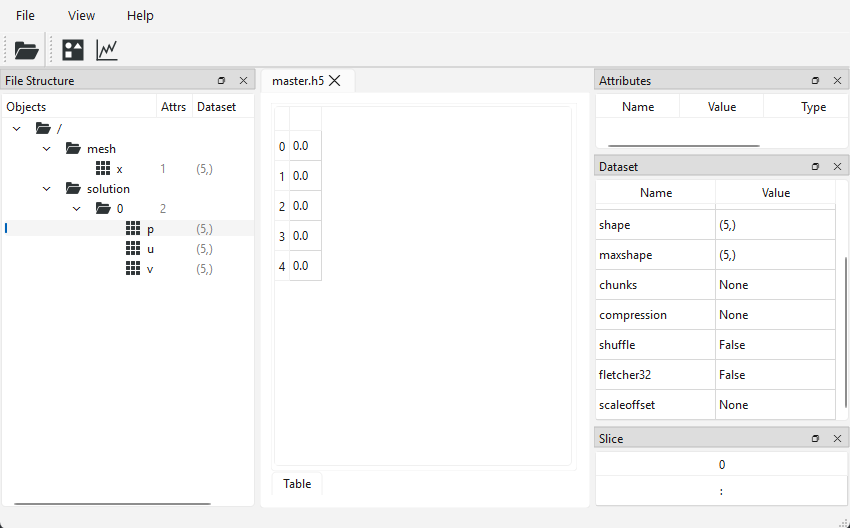
Here, I have selected the pressure dataset, and you can see that I can see the data that it holds, based on the link back to the solution.h5 file. This is true for the x coordinate array, although not shown here in the screenshot. For testing, HDF5view is a fantastic little utility tool and worth installing to double-check your data is written as expected.
Next up, the part I probably dread the most: Attributes. You will see why shortly.
Adding attributes to datasets (primitive types)
OK, we have to address the elephant in the room. Attributes. In principle, they are a very good addition to HDF5. Attributes are additional freeform metadata you can write to your file to help you make sense of the data. For example, you may want to leave some notes about the simulation setup, so you know how these results were obtained.
For example, you want to dump the entire settings of your solver into the HDF5 file so you can inspect those together with your data. If you wanted, you can. However, there is likely a much more useful annotation you want to provide to your data, which is units.
So far in our examples, we have stored raw data, but we never actually specified the units of that raw data. Sure, you could assume that due to my education at German/British universities, I likely tend to use SI units, but we should have higher standards than guessing ones intention (or units that were used). Instead, since we are able to write attributes directly to HDF5 files, we may as well use that functionality to specifically write the units alongside each dataset.
Each attribute consists of two pieces of information, a key and a value. Anyone who has ever worked with a hash table (or map, or dictionary, as they are also known in C++ and Python, respectively) will be familiar with key, value pairs. In our case, we may have a key of "unit" and a value of "m" for metres, for example, or "Pa", for Pascal.
This is what we want to store: the units for the x coordinate array, the u and v velocity components, as well as the pressure p. If we limit ourselves to storing units as m, m/s and Pa, respectively, we have two choices here:
m: This is a single character, so we can store it as such. If we do, HDF5 will store the ASCII number of the letter m, which is 109. So, if we open our HDF5 file and view our attributes, we would see 109 instead ofm.m/sandPa: Since both of these units store more than one character, we must create a custom string property first and store that. This requires more upfront work and, yes, lots moreH5P_DEFAULTs, but it will store our units as text, and we will be able to seem/sandPainside hdf5view, for example.
I will show both cases, not because I think one is preferable over the other, but just for completeness so that we can see how to implement either of these approaches.
We will reuse the master.h5 file we created in the previous example and add some units for the raw data we have written to it. For the first time, we are actually not going to truncate our file. Wanna guess what the file opening mode for appending data to an existing HDF5 is? If you are hoping for H5F_ACC_ENLARGE, H5F_ACC_SUPERCHARGE, or H5F_ACC_BIG_BOI, I'm sorry to disappoint you, we are using H5F_ACC_RDWR, which supposedly stands for read/write.
Why do we start to use common sense words now? I suppose the only consistency here is that we are applying logic inconsistently. In any case, the file opening command becomes:
1 | hid_t master_id = H5Fopen("master.h5", H5F_ACC_RDWR, H5P_DEFAULT); |
First, we will write the units of m to the mesh. For that, we specify the value (of type char) we want to store.
Next, we specify the chara
1 | const char mesh_unit = 'm'; |
Quick sidebar, because that is genuinely confusing in c++ and will catch out at least one reader, so it is worth highlighting. In C (and c++ by extension), when we work with characters (char), we can either specify a single character as we have done above, or a string of characters, which then become an array of characters, essentially. The way that we do that is as follows:
1 2 | const char mesh_unit = 'm'; const char *pressure_unit = "Pa"; |
Two things: First, when we deal with an array of characters, we have to make the variable a pointer (as indicated by the asterisks, i.e. *). Second, a single char needs single quotes ('m') while an array of characters needs double quotes ("Pa"). This second point in particular can catch people out easily and is a rather big annoyance.
Well, I personally get around this issue by using std::strings for everying text related in my c++ code, but when I need to interface my code with C libraries (like HDF5), we are forced to work with plain chars again. However, we can still use std::strings if we want. For example, we may have:
1 | const std::string pressure_unit = "Pa"; |
Under the hood, C++ stores this string as an array of characters (i.e. of type const char *). We can always get this character array back by calling the c_str() function on the string, i.e.
1 | std::cout << pressure_unit.c_str() << std::endl; |
The type of pressure_unit.c_str() is again const char * and this allows us to use strings, if we wanted, with C libraries. In any case, I just keep using chars in this example so as not to obfuscate which types we are using.
Once we have created our character we want to store, we need to create a scalar space next. The scalar space tells HDF5 how many elements we want to store. In our case (and likely most of the cases you encounter), you want to store a single element only (e.g. we want to store a single unit for each key like m or Pa). We do that by calling the following function:
1 | hid_t scalar_space = H5Screate(H5S_SCALAR); |
If we wanted to store more than one argument, the first argument would become H5S_SIMPLE. For example, if we wanted to store the settings of our CFD solver as well, we likely have more than one entry to write. Think of it this way:
H5S_SCALAR: We write exactly one element (one string, one double, one float, one boolean, etc.)H5S_SIMPLE: We write an array of elements (several strings, doubles, floats, booleans, etc.)
Next, we need to get a handle to the dataset, so we know later to which dataset we want to write our attribute:
1 | hid_t dataset_x = H5Dopen(master_id, "/mesh/x", H5P_DEFAULT); |
Next, I want to make sure no attribute has been written yet. This is important; otherwise, the attribute creation may work correctly if there is no attribute yet, but on subsequent opening of the file and trying to write the same attribute again, you will get an error message.
Thus, we want to first check if the attribute, in the case of name unit, already exists. If it doesn't, we want to write it. For that, we use an if statement to ensure the attribute does not yet exist:
1 2 3 4 | hid_t attr_mesh; if (!H5Aexists(dataset_x, "unit")) { /// write attribute here } |
Within the if statement, I am calling the H5Aexists() function. Note that the third letter here is A, for attribute, so we are checking if the attribute unit exists in the dataset_x object, which we created in the previous function call, pointing to the dataset at /mesh/x.
If the attribute does not exist, we go into the if block. Inside this block, we execute the following code:
1 2 3 | attr_mesh = H5Acreate(dataset_x, "unit", H5T_NATIVE_CHAR, scalar_space, H5P_DEFAULT, H5P_DEFAULT); H5Awrite(attr_mesh, H5T_NATIVE_CHAR, &mesh_unit); H5Aclose(attr_mesh); |
First, we call the H5Acreate() function, which creates the attribute for us. We provide the location where the attribute should be created (dataset_x), the attribute name or key to create (unit), the type to use (we use native characters here, so H5T_NATIVE_CHAR), and we reference the scalar space we have created before (so HDF5 knows that we will only ever write a single element to the unit attribute).
As per usual, we ignore the two final arguments around the attribute creation and access property lists and slap on some good old H5P_DEFAULT values here.
While the H5Acreate() function creates the attribute name/key, to write the actual value to it we need to use the H5Awrite() function. This is the second function we call, and we see that the first argument is the object identifier/handle that we received when we called the H5Acreate() function. Here, we are also writing the value as a native char, and the actual character that we write is referenced as the third argument.
We pass the third argument by reference (using the & sign), which tells C++ to write whatever mesh_unit points to in memory. The third argument is always expecting a pointer, so we always need to dereference our variables here using the & operator.
Once we are done writing the key and value (or attribute), we can close the returned handle to ensure no memory is leaking.
This wasn't that bad, but we have only written a single character. If we want to write an entire string, we need to do yet more setup work, which we will do in the next example, but I am getting ahead of myself. The code below shows the entire code for adding the unit m to the x coordinate array as discussed above:
1 2 3 4 5 6 7 8 9 10 11 12 13 14 15 16 17 18 19 20 21 22 23 24 25 26 27 28 29 30 31 32 33 34 35 | #include <hdf5.h> int main() { /// create a new file that links to the mesh and solution file /// H5F_ACC_RDWR: READ/WRITE permission hid_t master_id = H5Fopen("master.h5", H5F_ACC_RDWR, H5P_DEFAULT); /// storing the units for the mesh (single character) this time const char mesh_unit = 'm'; /// create a dataspace that represents just a single scalar double value hid_t scalar_space = H5Screate(H5S_SCALAR); /// open dataset hid_t dataset_x = H5Dopen(master_id, "/mesh/x", H5P_DEFAULT); hid_t attr_mesh; if (!H5Aexists(dataset_x, "unit")) { /// create an attribute for the dataset at /mesh/x, unless it already exists attr_mesh = H5Acreate(dataset_x, "unit", H5T_NATIVE_CHAR, scalar_space, H5P_DEFAULT, H5P_DEFAULT); /// now let's write the value of the attribute, i.e. the actual flow time H5Awrite(attr_mesh, H5T_NATIVE_CHAR, &mesh_unit); /// clean up locally, only if needed H5Aclose(attr_mesh); } /// clean up H5Dclose(dataset_x); H5Sclose(scalar_space); H5Fclose(master_id); return 0; } |
If we now open this file in hdf5view, we see the following:
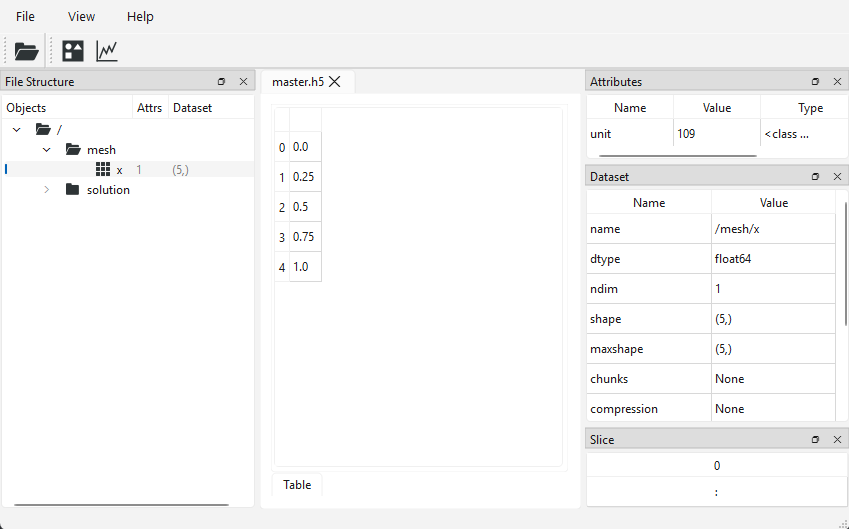
In the top right, we see the attribute with the key/name of "unit" and a value of 109 (ASCII code for the letter "m"). So much code for so little effort. In any case. Let's now look at how we can write a string instead of a character, so that we can actually see units like "Pa" in hdf5view as well.
Adding attributes to datasets (compound types)
OK, in this example we will, as alluded to, write strings, not just characters, to the HDF5 file so we can actually inspect our attributes. Instead of writing the units for the velocity and pressure components, I will add something else: the time at which the solution was recorded (in seconds), and then I will also add the unit for that (which is s, but despite being again just a single character, we will store it this time as a string).
Remember that we stored our solution in a group of /solution/0/<var>. I want to write the time (here, 0 seconds) to each group, so that this information can be read as well from the metadata.
Writing the seconds is very similar to what we did before, except that we are now writing a double instead of a character, so the attribute writing is slightly modified. Instead of going through each element again in detail, I'll give you the entire code here. If you understood the previous section, this should hopefully make sense as well:
1 2 3 4 5 6 7 8 9 10 11 12 | hid_t master_id = H5Fopen("master.h5", H5F_ACC_RDWR, H5P_DEFAULT); hid_t scalar_space = H5Screate(H5S_SCALAR); hid_t group_0 = H5Gopen(master_id, "/solution/0", H5P_DEFAULT); hid_t attr_time; if (!H5Aexists(group_0, "time")) { double time = 0.0; hid_t scalar_space = H5Screate(H5S_SCALAR); attr_time = H5Acreate(group_0, "time", H5T_NATIVE_DOUBLE, scalar_space, H5P_DEFAULT, H5P_DEFAULT); H5Awrite(attr_time, H5T_NATIVE_DOUBLE, &time); H5Sclose(scalar_space); } |
First, we open the HDF5 file and create a scalar space to hold exactly one element (in this case, the time as a double), and then we create an attribute with the name/key of "time" and then write the time itself, which is stored as a double with the value 0.0 inside this "time" attribute.
This is just a good recap of what we already did and shows how to deal with different data types as well.
Next, we want to store the unit of time, i.e. seconds as s, but using a string. In C, there is no such thing as a string, and so we need to create our own custom type in HDF5. We do that by chaining several primitive types together, in this case, the character type, and we tell HDF5 how many times (i.e. the length of the string).
The length of the string (and this is the number of characters we need to store) is equal to the number of characters + 1. So, for our case, we have 1 character s, and so we need to store a total of 2 characters in our custom string that we create. We need to add one more character to hold the null-terminated character \0. This character signifies the end of a string in C, and so we need to add it at the end of the string.
The process is fairly similar to writing a native variable type like a single character or a double, but just involves a few extra steps.
First, we check again if the "units" attribute exists (I know, we used "unit" before in the previous example; I suppose working for too long with HDF5 relaxes your consistency quite a bit. I could fix it, I suppose, but I won't ...)
1 2 3 4 | hid_t attr_units; if (!H5Aexists(group_0, "units")) { /// create attribute } |
If it does not exist, we go ahead and create the attribute now within the if block. First, we specify the string we want to store. Even though this is a single character, I store it now as a string of characters using the const char * type as discussed previously. I could have used const char instead, since we are only using a single variable here, but, if you wanted to adapt that example and use an actual string here, then you would get compiler errors if you use const char, so I have used const char * instead.
1 | const char *units = "s"; |
Previously, we would have created our scalar space and then created our attribute. Now, though, we need to first create our custom string type from characters. We do that with the following call:
1 | hid_t unit_str_type = H5Tcopy(H5T_C_S1); |
We are using the H5Tnamespace here, which contains all functions required for our own custom types we may want to derive. We notice that we use the H5Tcopy() function in particular, which allows us to copy an existing type. The H5T_C_S1 exists as a convenience for us and essentially states that we want to create a string (S) from a set of characters (C). Cool!
At this point, I should point out that you can create your very own and wild datatypes. As long as you know the memory shape and layout, you can create custom types. The H5T environment has quite a few functions available to help you. This is where we have to keep in mind that HDF5 wants to support everyone and anyone willing to learn their syntax. In CFD, most of the time we are happy with simply storing raw numerical data, perhaps some strings, and so we may not need all of this added functionality.
But it is there for those who wish to go crazy, so be my guest and knock yourself out over an extended HDF5 speedrun competition, writing a CFD solver that uses every single function call. Or don't ...
Now that we have the type, we need to tell HDF5 how many elements (characters) are in our custom string. We have s plus the null-terminated character, so 2 elements in total. We tell that to HDF5 with the H5Tset_size() method.
1 2 | H5Tset_size(unit_str_type, 2); H5Tset_strpad(unit_str_type, H5T_STR_NULLTERM); |
Great job, so we now also have snake_cases in the function name, when we did not use them before. What we can summarise is that there is a half-hearted consistency in the function naming convention. Stuff like this genuinely keeps me up at night; why did they do this? OK, calm down Tom ...
In any case, after we set the size, we also set the string to contain the null-terminated character.
With that done, we can now proceed as before, i.e. create a scalar space to tell HDF5 that we are writing exactly one element (string), and this string will contain the new datatype unit_str_type that we have just created:
1 2 3 | hid_t scalar_space = H5Screate(H5S_SCALAR); attr_units = H5Acreate(group_0, "units", unit_str_type, scalar_space, H5P_DEFAULT, H5P_DEFAULT); H5Awrite(attr_units, unit_str_type, units); |
Remember, the group_0 variable points to /solution/0. The type we are storing is the new string type we created, i.e. unit_str_type, and we expect to write a single element, as indicated by the scalar space (of type H5S_SCALAR).
When we write the value for the "units" name/key, we write the units variable directly, while we had to dereference the time variable before (i.e. we had &time before as the third argument to H5Awrite()).
Remember that the time variable was declared as double time = 0.0; while the units variable was declared as const char *units = "s";. The units variable is already declared as a pointer (*) so we do not need to dereference it when we pass it to the function call.
I admit that this isn't always easy and straightforward to see, and this is one of the oddities when it comes to working with memory in C and C++. I used to struggle with this quite a bit and, to be honest, I have not met a single person who did not struggle with pointers and memory access. If you feel this is complicated, that's because it is. It only gets better by writing more pointer code and learning from compiler mistakes. No magic ChatGPT pill can help you here; failure is your best path to mastery.
After we have written our attributes, we can close all handles within the same if block:
1 2 3 | H5Sclose(scalar_space); H5Tclose(unit_str_type); H5Aclose(attr_units); |
And that's it. We can now inspect the 0 group in HDF5view again and see the following information:
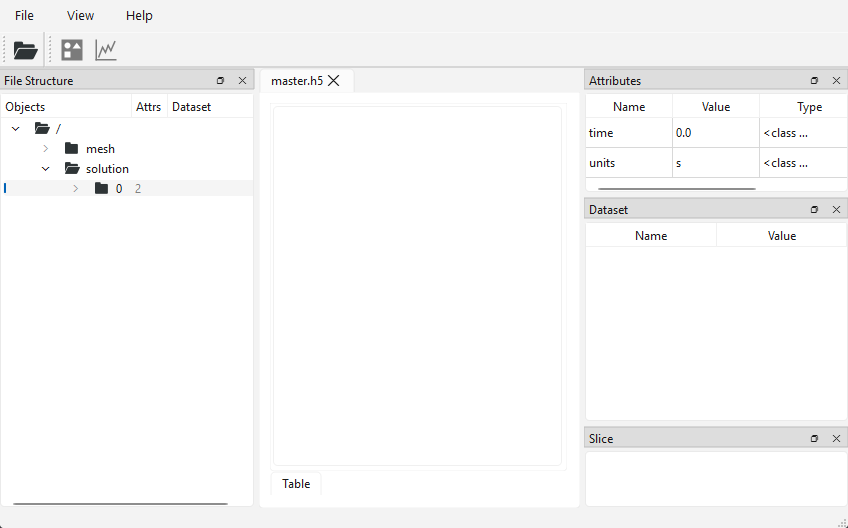
We see that the time variable itself has been written as 0.0, and the corresponding unit appears as s, no cryptic ASCII letter this time. And that's it. This is how we deal with attributes in HDF5. The full code is given again below for reference:
1 2 3 4 5 6 7 8 9 10 11 12 13 14 15 16 17 18 19 20 21 22 23 24 25 26 27 28 29 30 31 32 33 34 35 36 37 38 39 40 41 42 43 44 45 46 47 48 49 50 51 52 53 54 55 56 57 58 59 60 61 62 63 64 65 66 67 68 69 | #include <hdf5.h> int main() { /// create a new file that links to the mesh and solution file /// H5F_ACC_RDWR: READ/WRITE permission hid_t master_id = H5Fopen("master.h5", H5F_ACC_RDWR, H5P_DEFAULT); /// create a dataspace that represents just a single scalar double value hid_t scalar_space = H5Screate(H5S_SCALAR); /// open dataset hid_t group_0 = H5Gopen(master_id, "/solution/0", H5P_DEFAULT); /// write the time for the current solution hid_t attr_time; if (!H5Aexists(group_0, "time")) { /// storing the flow time as an attribute double time = 0.0; /// create a dataspace that represents just a single scalar double value hid_t scalar_space = H5Screate(H5S_SCALAR); /// create an attribute for group_time_0, e.g. /solution/timestep/0 attr_time = H5Acreate(group_0, "time", H5T_NATIVE_DOUBLE, scalar_space, H5P_DEFAULT, H5P_DEFAULT); /// now let's write the value of the attribute, i.e. the actual flow time H5Awrite(attr_time, H5T_NATIVE_DOUBLE, &time); /// clean up locally H5Sclose(scalar_space); } /// write the units for the current time hid_t attr_units; if (!H5Aexists(group_0, "units")) { /// let's append units to each dataset const char *units = "s"; /// custom string type hid_t unit_str_type = H5Tcopy(H5T_C_S1); /// set the number of characters, which includes the null-terminated character H5Tset_size(unit_str_type, 2); // 's','\0' /// set the string to be null-terminated H5Tset_strpad(unit_str_type, H5T_STR_NULLTERM); /// create a dataspace that represents just a single scalar double value hid_t scalar_space = H5Screate(H5S_SCALAR); /// create an attribute for each dataset attr_units = H5Acreate(group_0, "units", unit_str_type, scalar_space, H5P_DEFAULT, H5P_DEFAULT); /// now let's write the value of the attribute, i.e. the actual flow time H5Awrite(attr_units, unit_str_type, units); /// clean up locally H5Sclose(scalar_space); H5Tclose(unit_str_type); H5Aclose(attr_units); } /// clean up H5Gclose(group_0); H5Aclose(attr_time); H5Fclose(master_id); return 0; } |
At this point, we have built up a fairly comprehensive knowledge of HDF5. In the next couple of examples, I want to look at some use cases for HDF5 and how we may use that in our CFD solver.
First, we will look at how we can write a file in a format that Paraview understands so that we can visualise our results directly. Afterwards, we will also look at how to read data back from an HDF5 file so that we can create restart files for our CFD solvers.
Interfacing with post-processors: Reading HDF5 files in Paraview
From a conceptual point of view, there are no hurdles to reading HDF5 files into Paraview. It already supports the reading of HDF5 files, but that doesn't mean that we can now throw our created master.h5 file into Paraview (or, for that matter, into any other post-processing tool).
Think about it this way: you and I know that we probably want to store some CFD data, but even that is ambiguous. What are we storing? x and y? Or are we also storing the third coordinate direction z? And what primitive variables are we storing? u, v and w? Are we storing pressure p as well? Are we storing temperature? If so, are we storing the total temperature, static temperature, or some other form of heat instead? What name do we give it? What about people who want to store conserved variables instead?
You see, even for CFD applications, it becomes difficult to establish a common ground of what needs to be stored and what name to give it. And even if we could come up with a comprehensive naming convention (in which case, we probably would just reinvent the CGNS file, which is pointless), that would be CFD-specific. Someone doing medical imaging or structural simulations will have no use for our comprehensive new file format.
So, the way we get our HDF5 files into Paraview is not by reading them in directly; Paraview is a general-purpose post-processor and does not support reading of unformatted HDF5 files (it does support reading of formatted HDF5 files, e.g. CGNS files). Instead, we have to provide the structure of our HDF5 file, which will act sort of like a table of contents in a book, i.e. it outlines the structure without revealing any details.
This structure is provided in the form of an XDMF3 file. The XDMF3 file format is a self-contained file format in its own right; that is, you can store data directly inside an XDMF3 file, but it also allows you to point to datasets in an HDF5 file, similar to how links work in HDF5.
The downside with XDMF3 is that it is an XML-based file format and I hate XML files. I find them overly verbose and not human-friendly (there is a chance that Microsoft's overuse of XML files has something to do with it ...). On top of that, XDMF3 is supported by Paraview, but not by Tecplot. Tecplot has much better support for CGNS files, but Paraview refuses to work with them (at least once you start to introduce some more advanced concepts like linking).
Polyhedral element support is great in XDMF3 files but limited in CGNS files. If we want to have true polyhedral element support in Tecplot as well, we need to use TecIO, which essentially locks us into the Tecplot e
This paragraph was not written by someone who has spent too much time trying to find a general purpose file format that is usable by both Paraview and Tecplot users for structured and usntructured use cases with arbitrary elements ...
If I have to choose between two post processors and which one I want to support, the open-source, free-to-use software always wins in my book (and I have never been a great Tecplot fan, but please don't snitch on me to the Tecplot representative that is sent once a year to us to teach Tecplot to our students ...).
But then again, go ahead and snitch on me; I told him a few times that my heart belongs to Paraview. We get on great nonetheless. He is German as well ...
In any case, XDMF3 is not a difficult file format; in fact, if you follow the link I have provided and read through the XDMF3 wiki, you will get the idea for how this file format works. We will create one such file in this section together, but I will limit the discussion to what we need here to get our file into Paraview.
What we cover here will likely be sufficient to cover all of your other use cases as well, should you adopt HDF5+XDMF3 for your own projects. Granted, I will concentrate on structured grids and writing/reading unstructured data is slightly different, but the XDMF3 wiki linked above has sufficient details to show how to go from structured to unstructured.
OK, so what are we going to do in this section, then? To make things a little bit more interesting, we are going to create a 3D cube (I know, a cube, pure WOW factor), BUT we are going to initialise the solution here with some more interesting initial conditions.
I will be pretending that we wanted to solve the Taylor-Green Vortex flow, which has a customised velocity field based on sine and cosine waves. It's a common test case for generating turbulent flows and studying turbulent structures and numerical schemes for turbulent flows. Given that there are no solid walls (all sides are periodic), we are able to perform LES and even DNS simulations relatively cheaply. Here are some iso-contours of the decaying turbulence:
We will only initialise the flow with the same data but not perform any simulations, but that will give us something prettier to look at in Paraview than just a uniform or randomly initialised solution.
On our 3D cube, we will initialise the velocity and pressure using the following initial conditions:
Note: in the full Taylor-Green Vortex setup, you will have a few additional parameters like the density. I have set all of them to 1 or 0 to get a simplified initial value expression.
So, we have to do some setup first, and then we can store it to an HDF5 file. Let's create the required arrays that we want to store, i.e. the coordinate array and the velocity/pressure data.
First of all, we define a few includes:
1 2 3 4 | #include <hdf5.h> #include <vector> #include <cmath> #include <numbers> |
We import HDF5 again, and I am making use of a few additional headers here:
vector: Dynamic array which we will use to store our solution vectors incmath: Provides access to sine and cosine functionsnumbers: In the year of the lord 2020, c++ received official support for . It lives in thenumbersheader file, and we need to be very careful not to spook it; we don't want it to leave c++ again.
Next, we enter our main() function and define how many points we want to use in each direction (we will construct a structured, Cartesian grid), as well as the size of the domain:
1 2 | const int N = 32; const double L = 2.0 * std::numbers::pi; |
This is enough information to define our coordinate array:
1 2 3 | std::vector<double> coords(N); for (int i = 0; i < N; ++i) coords[i] = i * L / (N - 1); |
We define a single vector here, and I am making use of the fact that the coordinate array in each direction is the same (in terms of number of elements and values), so I create it once and use it for each direction. A bit of a cheap memory optimisation.
The creation of the velocity and pressure array is as follows:
1 2 3 4 5 6 7 8 9 10 11 12 13 14 15 16 17 18 | const int Ntotal = N * N * N; std::vector<double> u(Ntotal), v(Ntotal), w(Ntotal), p(Ntotal); for (int i = 0; i < N; ++i) { for (int j = 0; j < N; ++j) { for (int k = 0; k < N; ++k) { int idx = i * N * N + j * N + k; double x = coords[i]; double y = coords[j]; double z = coords[k]; u[idx] = std::sin(x) * std::cos(y) * std::cos(z); v[idx] = -std::cos(x) * std::sin(y) * std::cos(z); w[idx] = 0.0; p[idx] = (1.0 / 16.0) * (std::cos(2.0 * x) + std::cos(2.0 * y)) * (std::cos(2.0 * z) + 2.0); } } } |
This creation may surprise some of you. Even though this is a 3D, structured grid problem, I am storing my solution arrays as 1D arrays (i.e. we define the arrays as having a single dimension and a size of N * N * N).
This means that when we loop over all three space directions, i.e. in the i, j, and kdirections, we first need to reconstruct a 1D index from the i, j, and k indices. The reason I do that is that I have found that it is simpler to treat everything as a 1D array.
Sure, indexing may be slightly more complicated (but it doesn't get more complicated than what I am showing here in this example), but we are gaining more advantages. Unstructured grids typically also use 1D arrays for indices, so if we provide a common interface to retrieve data, we can write a solver that works on structured and unstructured grids without modifications.
Furthermore, if we are interested in parallelising our code (and, believe me, in CFD, we are, eventually!), working with 1D arrays is a lot easier than working with 2D, 3D, or a mix of them. Thus, let's use a 1D array here and be good CFD developer citizens.
You can see in this code snippet as well how I only really need to store the coordinates once and then retrieve the x, y, and z direction from it. With that initialisation done, we are ready to write our HDF5 file:
First, we create a new file (truncated to its core, of course):
1 | hid_t file_id = H5Fcreate("tgv.h5", H5F_ACC_TRUNC, H5P_DEFAULT, H5P_DEFAULT); |
Next, I want to store the coordinate arrays in the , , and direction. For that , we first create a /mesh group, under which we will store our x, y, and z coordinates. We'll also create a data space to tell HDF5 how many elements there are. Remember, our coordinate array is storing everything in 1D, so we store the corresponding coordinate array as a 1D array as well. This is done in the following:
1 2 3 | hid_t group_mesh = H5Gcreate(file_id, "/mesh", H5P_DEFAULT, H5P_DEFAULT, H5P_DEFAULT); hsize_t dims1D[1] = {N}; hid_t dataspace_1D = H5Screate_simple(1, dims1D, nullptr); |
With the /mesh group created, we can write the coordinate arrays to the HDF5 file. This is done in the following:
1 2 3 4 5 6 7 | for (const char* name : {"x", "y", "z"}) { hid_t dset = H5Dcreate(group_mesh, name, H5T_NATIVE_DOUBLE, dataspace_1D, H5P_DEFAULT, H5P_DEFAULT, H5P_DEFAULT); H5Dwrite(dset, H5T_NATIVE_DOUBLE, H5S_ALL, H5S_ALL, H5P_DEFAULT, coords.data()); H5Dclose(dset); } H5Sclose(dataspace_1D); H5Gclose(group_mesh); |
I am being a bit lazy here, in that I create a range-based for loop, which I construct in place. So, the for loop states that we have an array of character strings (since the type is const char*, we have a strong of characters, not a single character (even though we simply write a single character into that string, but we could have written more)).
Specifically, we have an array holding the character strings x, y, and z. When we start the loop, we will loop over all three of these values, which will be available within each loop with the name variable. We see that we use this name variable in our H5Dcreate call as the second argument, that is, we create a dataset with a name of either x, y, or z, which will, in turn, create the dataset /mesh/x, /mesh/y, or /mesh/z.
We are writing an array containing double elements (third argument), and we tell it how many double elements we are writing with the fourth argument (the data space) and ignore the last three options as per usual. We then write the coordinates with the H5Dwrite() function. Finally, we close all handles we no longer need.
At this point, we have written our coordinate arrays. If you wanted to write the data as proper 3D, structured data, you could have done so as well but would need to create a data space with 3D information, e.g.
1 2 | hsize_t dims3D[3] = {N, N, N}; hid_t dataspace_1D = H5Screate_simple(3, dims3D, nullptr); |
If you have different sizes in each direction, you can easily incorporate that with:
1 2 3 4 5 6 7 8 | const auto Nx = 32; const auto Ny = 64; const auto Nz = 128; // ... hsize_t dims3D[3] = {Nx, Ny, Nz}; hid_t dataspace_1D = H5Screate_simple(3, dims3D, nullptr); |
In fact, this is how we are going to store the solution arrays. First, let's create a group where we want to store our solution:
1 | hid_t group_sol = H5Gcreate(file_id, "/solution", H5P_DEFAULT, H5P_DEFAULT, H5P_DEFAULT); |
We create our /solution group where we want to store our flow solution data. Then, we create a dataspace, now a proper 3D one, with:
1 2 | hsize_t dims3D[3] = {N, N, N}; hid_t dataspace_3D = H5Screate_simple(3, dims3D, nullptr); |
You may be asking yourself as to why do we create a 1D dataframe for the coordinates and 3D dataframe for the solution? It is a perfectly reasonable question. The x coordinates only change in 1 coordinate direction (i.e. the x, or i direction). So, if I have a constant value of i=14, for example, it doesn't matter what my j or k indices are; the x-coordinate is always the same (so it is a genuine 1D array where data only changes in one direction).
For the flow solution, that is different, and the data does change as we change j and k for a fixed i value, so we need to store the data as a proper 3D array.
With the dataspace allocated, we can now proceed to writing the actual data, i.e. the three velocity components u, v, and w, as well as the pressure p. The way I do that is by constructing a std::vector with a type of std::pair. The pair itself has two entries, the first being the name of the field (e.g. u, v, w, and p), with the second being the actual data of that field.
1 2 3 | const std::vector<std::pair<const char*, const double*>> fields = { {"u", u.data()}, {"v", v.data()}, {"w", w.data()}, {"p", p.data()} }; |
We can always get a raw pointer of an array or vector in c++ by calling the .data() method on an array or vector, which is why the second argument of std::pair is of type const double*, i.e. a pointer of type double. It is also const since we are only writing the data, not changing it.
What this achieves is the ability to loop over all fields as for (auto [name, data] : fields). This loop will execute 4 times and gives us the name of the data we want to store, as well as its actual data, which has the same dimensions as specified by the dataspace. As a result, we can call H5Dcreate() and H5DWrite() directly with that data:
1 2 3 4 5 | for (auto [name, data] : fields) { hid_t dset = H5Dcreate(group_sol, name, H5T_NATIVE_DOUBLE, dataspace_3D, H5P_DEFAULT, H5P_DEFAULT, H5P_DEFAULT); H5Dwrite(dset, H5T_NATIVE_DOUBLE, H5S_ALL, H5S_ALL, H5P_DEFAULT, data); H5Dclose(dset); } |
Here, H5Dcreate() creates the path to the dataset by passing the name variable (e.g. u, v, w, or p). This creates the datasets /solution/u, /solution/v, /solution/w, and /solution/p. At this point, the datasets are all still empty, but we are populating them with data through the H5Dwrite() call, where we pass in the data argument (e.g. u.data(), v.data(), w.data(), and p.data()).
Finally, we clean up after ourselves, as usual:
1 2 3 4 | /// clean up H5Sclose(dataspace_3D); H5Gclose(group_sol); H5Fclose(file_id); |
And this is the file writing done. The code below shows all of the above in one, single, self-contained example code:
1 2 3 4 5 6 7 8 9 10 11 12 13 14 15 16 17 18 19 20 21 22 23 24 25 26 27 28 29 30 31 32 33 34 35 36 37 38 39 40 41 42 43 44 45 46 47 48 49 50 51 52 53 54 55 56 57 58 59 60 61 62 63 64 65 66 67 68 69 70 71 | #include <hdf5.h> #include <vector> #include <cmath> #include <numbers> int main() { const int N = 32; const double L = 2.0 * std::numbers::pi; /// create coordinate vectors std::vector<double> coords(N); for (int i = 0; i < N; ++i) coords[i] = i * L / (N - 1); /// primitive variable vectors const int Ntotal = N * N * N; std::vector<double> u(Ntotal), v(Ntotal), w(Ntotal), p(Ntotal); /// Taylor-Green vortex: U0=1, p0=0, rho0=1 for (int i = 0; i < N; ++i) { for (int j = 0; j < N; ++j) { for (int k = 0; k < N; ++k) { int idx = i * N * N + j * N + k; double x = coords[i]; double y = coords[j]; double z = coords[k]; u[idx] = std::sin(x) * std::cos(y) * std::cos(z); v[idx] = -std::cos(x) * std::sin(y) * std::cos(z); w[idx] = 0.0; p[idx] = (1.0 / 16.0) * (std::cos(2.0 * x) + std::cos(2.0 * y)) * (std::cos(2.0 * z) + 2.0); } } } /// create HDF5 file for taylor-green vortex problem, not french high-speed trains hid_t file_id = H5Fcreate("tgv.h5", H5F_ACC_TRUNC, H5P_DEFAULT, H5P_DEFAULT); /// Mesh group: 1D coordinate arrays (uniform, same in each direction) hid_t group_mesh = H5Gcreate(file_id, "/mesh", H5P_DEFAULT, H5P_DEFAULT, H5P_DEFAULT); hsize_t dims1D[1] = {N}; hid_t dataspace_1D = H5Screate_simple(1, dims1D, nullptr); for (const char* name : {"x", "y", "z"}) { hid_t dset = H5Dcreate(group_mesh, name, H5T_NATIVE_DOUBLE, dataspace_1D, H5P_DEFAULT, H5P_DEFAULT, H5P_DEFAULT); H5Dwrite(dset, H5T_NATIVE_DOUBLE, H5S_ALL, H5S_ALL, H5P_DEFAULT, coords.data()); H5Dclose(dset); } H5Sclose(dataspace_1D); H5Gclose(group_mesh); /// Solution group: 3D fields stored as (Nz, Ny, Nx) hid_t group_sol = H5Gcreate(file_id, "/solution", H5P_DEFAULT, H5P_DEFAULT, H5P_DEFAULT); hsize_t dims3D[3] = {N, N, N}; hid_t dataspace_3D = H5Screate_simple(3, dims3D, nullptr); const std::vector<std::pair<const char*, const double*>> fields = { {"u", u.data()}, {"v", v.data()}, {"w", w.data()}, {"p", p.data()} }; for (auto [name, data] : fields) { hid_t dset = H5Dcreate(group_sol, name, H5T_NATIVE_DOUBLE, dataspace_3D, H5P_DEFAULT, H5P_DEFAULT, H5P_DEFAULT); H5Dwrite(dset, H5T_NATIVE_DOUBLE, H5S_ALL, H5S_ALL, H5P_DEFAULT, data); H5Dclose(dset); } /// clean up H5Sclose(dataspace_3D); H5Gclose(group_sol); H5Fclose(file_id); return 0; } |
So far so good, but we have no way of opening that just yet in Paraview. For that, we need to write our XDMF3 file to tell Paraview exactly where to find what. Let's go through the structure together, and you will get an idea of how this file works.
First, we define the xml version we want to use (version 1), and we declare that this is an XDMF3 file, i.e. this is what we commonly would call the header of a file. There is also version 2, but XDMF3 is the default these days. Why live in the past?
1 2 3 4 5 | <?xml version="1.0" ?> <!DOCTYPE Xdmf SYSTEM "Xdmf.dtd" []> <Xdmf Version="3.0"> <!-- This is a comment; the rest of the file goes in here --> </Xdmf> |
The comment indicates that the actual file information goes here. The first element that we place is a <Domain> tag. A domain is essentially a container in which we can place as many different grids as we want. Why would that be useful? If you are writing a multi-block structured code, then each block could be written as its own entity to a <Domain> node.
So, each <Domain> tag will have one (or more) corresponding <Grid> tags. Let's write those down already:
1 2 3 4 5 | <Domain> <Grid Name="TaylorGreenVortex" GridType="Uniform"> <!-- Information about the mesh and the solution goes here --> </Grid> </Domain> |
Here, we give each <Grid> node its own name, as well as a type. We are providing the Uniform option here, and there are more, but Uniform is what you would use for CFD data. The other types supported by XDMF3 target more general use cases (e.g. surface triangulation, with various groups of triangles forming one body, e.g. a multi-group CAD assembly). You can read up on the different types if you must on the wiki.
Now let's look at storing the actual mesh. We do that by first describing the topology. The topology allows us to differentiate between structured and unstructured grids. In our case, we have:
1 | <Topology TopologyType="3DRectMesh" Dimensions="32 32 32"/> |
You can see that we use a topology type of 3DRectMesh, and there are more. In the wiki, you will find the following types listed:
Structured grids
- 2DSMesh: Curvilinear, 2D mesh
- 2DRectMesh: Axis-aligned 2D mesh (e.g. a Cartesian mesh)
- 2DCoRectMesh: Axis-aligned 2D mesh with constant spacing
- 3DSMesh: Curvilinear, 3D mesh
- 3DRectMesh: Axis-aligned 3D mesh (e.g. a Cartesian mesh)
- 3DCoRectMesh: Axis-aligned 3D mesh with constant spacing
Unstructured grids:
For unstructured grids, we specify the element type we want to write, e.g. Triangle or Quadrilateral. Again, the wiki does list the various combinations that are allowed here.
In our case, both the 3DCoRectMesh and 3DRectMesh topology types are acceptable; I am using the more generic version here.
Now that the XDMF3 file knows that we are dealing with a structured grid with 32 elements in each direction, it is time to expose the data, i.e. store the mesh information. We do that by writing first a <Geometry> node, below which we have 3 separate <DataItem> nodes, all of which write one coordinate direction:
1 2 3 4 5 6 7 8 9 10 11 | <Geometry GeometryType="VXVYVZ"> <DataItem Name="x" Dimensions="32" NumberType="Float" Precision="8" Format="HDF"> tgv-highfive.h5:/mesh/x </DataItem> <DataItem Name="y" Dimensions="32" NumberType="Float" Precision="8" Format="HDF"> tgv-highfive.h5:/mesh/y </DataItem> <DataItem Name="z" Dimensions="32" NumberType="Float" Precision="8" Format="HDF"> tgv-highfive.h5:/mesh/z </DataItem> </Geometry> |
For the geometry type, we specify here VXVYVZ, which is great naming, top notch, on par with HDF5's versioning. A trip to the wiki, again, shows us that there are a few different options for us to choose:
XYZ: A single array containing all three coordinates (e.g.coords[i][j][k][x],coords[i][j][k][y], andcoords[i][j][k][z])XY: The same as above, except that z is set to zero throughout.X_Y_Z: All arrays are now provided separately (i.e.x[i][j][k],y[i][j][k], andz[i][j][k])VXVYVZ: This is what we have; we provide one array per axis (i.e.x[i],y[j], andz[k])ORIGIN_DXDYDZ: Even simpler, provide the origin (x,y,z) plus the constant distance between two points (dx, dy, dz). This would work for our case as well, but we already have the mesh as x, y, and z, so we are using that instead.ORIGIN_DXDY: Can you perform the mental arithmetic and figure out what this does?
After we described the geoemtry, we saw separate <DataItem>'s for each coordinate, e.g.
1 2 3 | <DataItem Name="x" Dimensions="32" NumberType="Float" Precision="8" Format="HDF"> tgv-highfive.h5:/mesh/x </DataItem> |
We specify the Name property (that is the name this variable will later be displayed as in Paraview), the dimension (a bit of a duplication of what is already in the topology section), the type, precision, and, importantly, the format. In our case, it is HDF (interestingly, not HDF5; seemingly, I am not the only person with an issue with its numbering and versioning).
The actual data item is then the HDF5 file itself with the path to where that specific dataset is stored within the file, separated by double colon. This provides us with the mesh information.
After the <Geometry> is provided, we can go on to store the flow solution, i.e. the velocity and pressure values. We do that through <Attribute> nodes. An example is given below:
1 2 3 4 5 | <Attribute Name="u" AttributeType="Scalar" Center="Node"> <DataItem Dimensions="32 32 32" NumberType="Float" Precision="8" Format="HDF"> tgv-highfive.h5:/solution/u </DataItem> </Attribute> |
It is fairly similar to the mesh example, except that now we are storing a 3D array (each flow solution has a value at i, j, and k); thus we need to specify the dimensions in all three directions explicitly again. The rest is the same as for the mesh, i.e we specify the filename and the location within that file. This is how Paraview knows what is geometry (mesh) and what is attributes (flow solutions).
1 2 3 4 5 6 7 8 9 10 11 12 13 14 15 16 17 | <Attribute Name="v" AttributeType="Scalar" Center="Node"> <DataItem Dimensions="32 32 32" NumberType="Float" Precision="8" Format="HDF"> tgv-highfive.h5:/solution/v </DataItem> </Attribute> <Attribute Name="w" AttributeType="Scalar" Center="Node"> <DataItem Dimensions="32 32 32" NumberType="Float" Precision="8" Format="HDF"> tgv-highfive.h5:/solution/w </DataItem> </Attribute> <Attribute Name="p" AttributeType="Scalar" Center="Node"> <DataItem Dimensions="32 32 32" NumberType="Float" Precision="8" Format="HDF"> tgv-highfive.h5:/solution/p </DataItem> </Attribute> |
For completeness, here is the entire XDMF3 file, which we store as solution.xdmf, for example:
1 2 3 4 5 6 7 8 9 10 11 12 13 14 15 16 17 18 19 20 21 22 23 24 25 26 27 28 29 30 31 32 33 34 35 36 37 38 39 40 41 42 43 44 45 46 47 48 49 50 51 52 53 54 | <?xml version="1.0" ?> <!DOCTYPE Xdmf SYSTEM "Xdmf.dtd" []> <Xdmf Version="3.0"> <Domain> <Grid Name="TaylorGreenVortex" GridType="Uniform"> <!-- 3D rectilinear mesh: 32x32x32 nodes --> <!-- Dimensions order matches HDF5 storage: slowest-varying index first (x here) --> <Topology TopologyType="3DRectMesh" Dimensions="32 32 32"/> <!-- Separate 1D coordinate vectors for each axis --> <Geometry GeometryType="VXVYVZ"> <DataItem Name="x" Dimensions="32" NumberType="Float" Precision="8" Format="HDF"> tgv-highfive.h5:/mesh/x </DataItem> <DataItem Name="y" Dimensions="32" NumberType="Float" Precision="8" Format="HDF"> tgv-highfive.h5:/mesh/y </DataItem> <DataItem Name="z" Dimensions="32" NumberType="Float" Precision="8" Format="HDF"> tgv-highfive.h5:/mesh/z </DataItem> </Geometry> <!-- Velocity component u --> <Attribute Name="u" AttributeType="Scalar" Center="Node"> <DataItem Dimensions="32 32 32" NumberType="Float" Precision="8" Format="HDF"> tgv-highfive.h5:/solution/u </DataItem> </Attribute> <!-- Velocity component v --> <Attribute Name="v" AttributeType="Scalar" Center="Node"> <DataItem Dimensions="32 32 32" NumberType="Float" Precision="8" Format="HDF"> tgv-highfive.h5:/solution/v </DataItem> </Attribute> <!-- Velocity component w --> <Attribute Name="w" AttributeType="Scalar" Center="Node"> <DataItem Dimensions="32 32 32" NumberType="Float" Precision="8" Format="HDF"> tgv-highfive.h5:/solution/w </DataItem> </Attribute> <!-- Pressure p --> <Attribute Name="p" AttributeType="Scalar" Center="Node"> <DataItem Dimensions="32 32 32" NumberType="Float" Precision="8" Format="HDF"> tgv-highfive.h5:/solution/p </DataItem> </Attribute> </Grid> </Domain> </Xdmf> |
And, with that done, we can now open this file in Paraview and read it. Here is what it will look like after opening it successfully in Paraview:
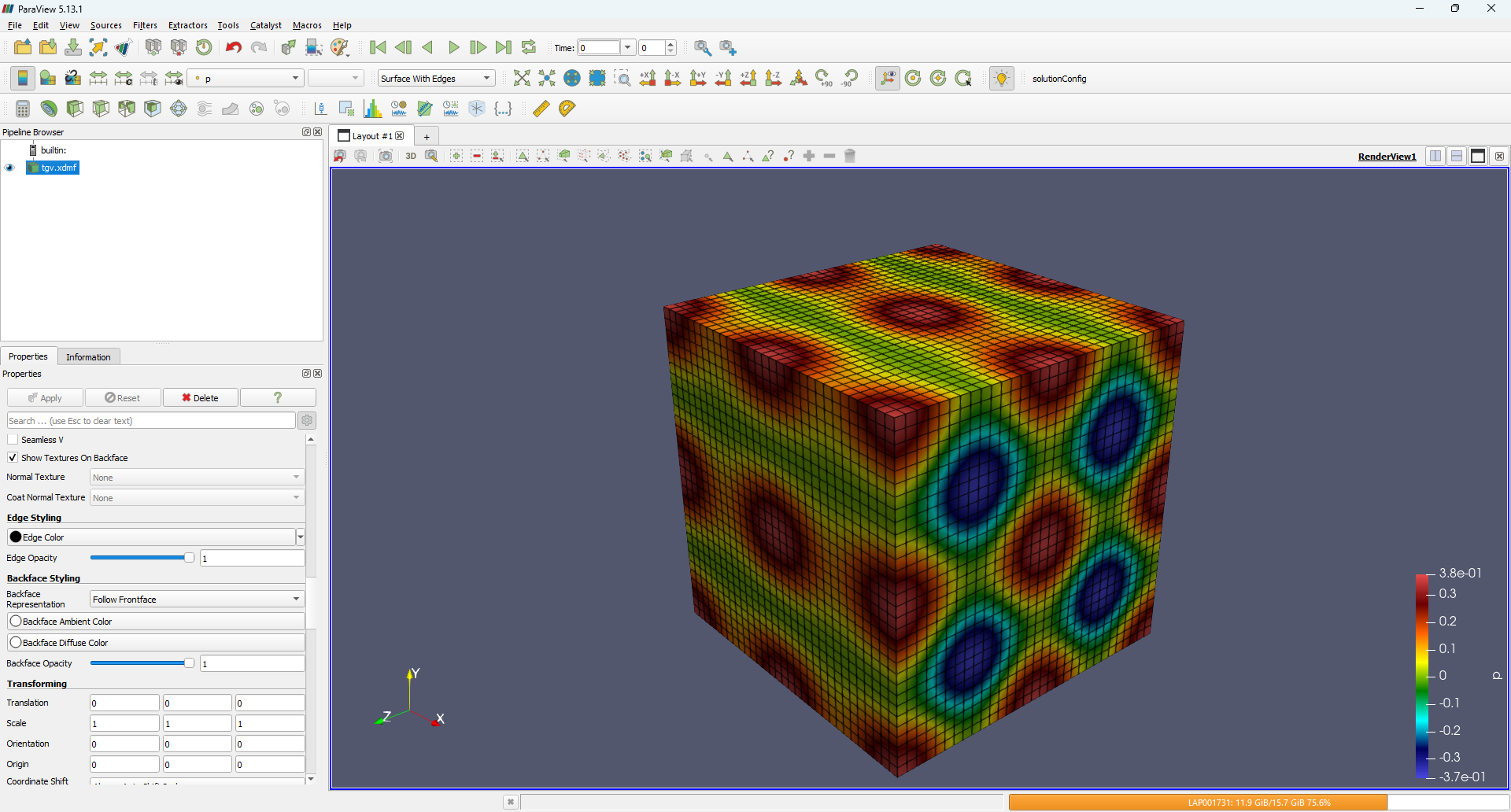
So, we were actually able to read our HDF5 file directly into Paraview, with a bit of help from XDMF3 to structure our data into something readable by Paraview. But that is not the only use case for HDF5; in the next section, we will look at restart files as well, as one of the remaining use cases.
Creating restart files
So far we have concentrated on writing HDF5 files exclusively. In this part, I want to look at how we can read HDF5 files as well. It isn't that complicated, and essentially we will change all occurrences of write to read. The obvious use for that is to read some results (and even a mesh) into your solver, either as initial conditions or to restart a previously run simulation.
Let's look at the code together; I'll go over the parts that should feel familiar by now a bit quicker so we can concentrate on the actual HDF5 reading logic.
I will use the Taylor-Green vortex problem from before, and we will be reading the coordinates and solution vectors again. We start by importing the required headers again and then allocating the required memory for each array:
1 2 3 4 5 6 7 8 9 10 11 12 13 14 15 16 17 18 | #include <hdf5.h> #include <vector> #include <iostream> int main() { const int N = 32; /// create vectors to store mesh and solution in const int Ntotal = N * N * N; std::vector<double> coords(N); std::vector<double> u(Ntotal), v(Ntotal), w(Ntotal), p(Ntotal); /// reading the mesh here /// reading the solution here return 0; } |
We allocate here a 1D array for the mesh. As we saw in the Taylor-Green Vortex problem, the x, y, and zcoordinates are essentially all the same, so we can reduce it down to a single coordinate array in 1D and map to the x, y, and z coordinates.
The solution vectors are stored as 1D arrays as well, as discussed in the Taylor-Green Vortex section (i.e. easier memory management, at the cost of somewhat more difficult indexing of 3D data arrays). The next step is to open the HDF5 file, which we do this time in read only mode, which uses the identifier H5F_ACC_RDONLY, as seen below:
1 | hid_t file_id = H5Fopen("tgv.h5", H5F_ACC_RDONLY, H5P_DEFAULT); |
With file now open and in read-only mode (i.e. we cannot write any new data, groups, or any other info to it), we can now open groups, which returns essentially a handle to the location in the file where we want to read some data from. Once we have that handle, we can read a dataset as well as shown below:
1 2 | hid_t group_mesh = H5Gopen(file_id, "/mesh", H5P_DEFAULT); hid_t dset_x = H5Dopen(group_mesh, "x", H5P_DEFAULT); |
Here, we are opening the dataset that stores the x coordinate, but we could have used the y or z coordinate here as well, as they all contain the same 1D array.
At this point, we have only read the dataset, but not the actual data we are after, i.e. the locations of the coordinates. For that, we use the H5Dread() function:
1 | H5Dread(dset_x, H5T_NATIVE_DOUBLE, H5S_ALL, H5S_ALL, H5P_DEFAULT, coords.data()); |
We want to read the entire array; hence, we are passing the H5S_ALL argument here twice, and the array contains doubles, which we also tell the function. The coordinate itself is written into the raw pointer exposed by a std::vector's data() accessor. Good old C-style raw pointer memory management.
Being good citizens, we clean up after ourselves:
1 2 | H5Dclose(dset_x); H5Gclose(group_mesh); |
Now that we have the coords array, which we can use for x, y, and z, we can go to the next step and read the solution. First, we need to open the actual group (path to solution):
1 | hid_t group_sol = H5Gopen(file_id, "/solution", H5P_DEFAULT); |
This gives us a handle so we can, again, read all datasets that sit under this group. I'll use the same std::pair as in the Taylor-Green Vortex example to tie a variable name to its raw memory array:
1 2 3 | const std::vector<std::pair<const char*, double*>> fields = { {"u", u.data()}, {"v", v.data()}, {"w", w.data()}, {"p", p.data()} }; |
We can exploit that again to loop over all variables to first read the dataset, and then extract the data from that dataset and store it in our variables like so:
1 2 3 4 5 | for (auto [name, data] : fields) { hid_t dset = H5Dopen(group_sol, name, H5P_DEFAULT); H5Dread(dset, H5T_NATIVE_DOUBLE, H5S_ALL, H5S_ALL, H5P_DEFAULT, data); H5Dclose(dset); } |
The is exactly the same thing we did in the Taylor-Green Vortex example, only in reverse now, and you'll see that the function signatures stayed essentially the same, we just changed here write to read and create to open (we also dropped the information on the dataspace, which is only relevant when we create a dataset, not when we open it).
Again, we clean up:
1 2 | H5Gclose(group_sol); H5Fclose(file_id); |
And that's that. If you understood how to write an HDF5 file, reading it isn't that much more complicated. The full code is given below, for reference, with an optional loop at the end that prints the first few values from the mesh and solution array. This allows us to sense-check that the data we read was done correctly.
1 2 3 4 5 6 7 8 9 10 11 12 13 14 15 16 17 18 19 20 21 22 23 24 25 26 27 28 29 30 31 32 33 34 35 36 37 38 39 40 41 42 43 44 45 46 47 48 49 50 51 52 53 | #include <hdf5.h> #include <vector> #include <iostream> int main() { const int N = 32; /// create vectors to store mesh and solution in const int Ntotal = N * N * N; std::vector<double> coords(N); std::vector<double> u(Ntotal), v(Ntotal), w(Ntotal), p(Ntotal); /// read mesh and solution from file hid_t file_id = H5Fopen("tgv.h5", H5F_ACC_RDONLY, H5P_DEFAULT); /// read 1D coordinate array from /mesh/x (x, y, z are identical for uniform grid) hid_t group_mesh = H5Gopen(file_id, "/mesh", H5P_DEFAULT); hid_t dset_x = H5Dopen(group_mesh, "x", H5P_DEFAULT); H5Dread(dset_x, H5T_NATIVE_DOUBLE, H5S_ALL, H5S_ALL, H5P_DEFAULT, coords.data()); H5Dclose(dset_x); H5Gclose(group_mesh); /// read 3D solution fields from /solution hid_t group_sol = H5Gopen(file_id, "/solution", H5P_DEFAULT); const std::vector<std::pair<const char*, double*>> fields = { {"u", u.data()}, {"v", v.data()}, {"w", w.data()}, {"p", p.data()} }; for (auto [name, data] : fields) { hid_t dset = H5Dopen(group_sol, name, H5P_DEFAULT); H5Dread(dset, H5T_NATIVE_DOUBLE, H5S_ALL, H5S_ALL, H5P_DEFAULT, data); H5Dclose(dset); } H5Gclose(group_sol); H5Fclose(file_id); /// inspect first 2 entries of each coordinate direction for (int i = 0; i < 2; ++i) { for (int j = 0; j < 2; ++j) { for (int k = 0; k < 2; ++k) { int idx = i * N * N + j * N + k; std::cout << "x: " << coords[i] << ", "; std::cout << "y: " << coords[j] << ", "; std::cout << "z: " << coords[k] << ", "; std::cout << "u: " << u[idx] << ", "; std::cout << "v: " << v[idx] << ", "; std::cout << "w: " << w[idx] << ", "; std::cout << "p: " << p[idx] << std::endl; } } } return 0; } |
Having arrived at this point, I'd say we have gotten a pretty good overview of what HDF5 can store, how it works, and how to integrate that into our everyday life (well, perhaps more into our solver writing activities, but by all means, use HDF5 in your daily routine if you can find useful applications for it ...).
Here are some examples where I may use it in everyday life:
STOMP: Sock Tracking and Operational Matching Platform:
1 2 3 4 | /socks/color /socks/thread_count /socks/last_seen /socks/probability_of_being_left_in_dryer |
FRIDGE: Food Repository Inventory and Disappointment Generation Engine:
1 2 3 4 | /fridge/id/timestamp /fridge/id/bottles_of_royal_milk_tea /fridge/id/number_of_cream_breads /fridge/id/dissapointment_index_due_to_insufficient_royal_milk_tea_and_cream_breads |
PROCRAST: Predictive Repository Of Chronic Repeated Avoidance and Start-Time Tracking
1 2 3 4 | /task/intended_start_time /task/actual_start_time /task/excuses /task/youtube_videos_watched |
I'm sure you can find additional use cases ...
Finally, the syntax makes sense: HighFive, the wrapper library
As promised earlier in the article, after we have been able to untangle the well-intended but version-infused messy API of the HDF5 file format, it is time to treat yo self. HDF5 provides a lot of functionality, and it doesn't target a specific language; instead, it wants to support as many applications as it can.
In reality, though, at least this is my experience, if you are working with HDF5, you are implementing small little helper functions that wrap all of the API boilerplate code required to do simple things like opening or creating a group (potentially with nested levels).
As we have seen, if we have a group like /path/to/solution/variables, which has 4 levels, this means we need to call H5Gcreate() 4 times. We get 4 group handles, which is followed by 4 calls to H5Gclose(). So, why not encapsulate all of that into a little function that does all of that for you? You only provide the HDF5 file handle and the group path you want to construct; the function will handle the actual implementation.
Well, we can build a collection of functions that help us to achieve common tasks, or we just make use of the work of others who have already come across exactly the same issue, and who provide us with their own collection of useful functions to use.
I personally have not used any of those, but when I was planning and researching some aspects of this article, I also included looking for these high-level libraries. The one I ultimately settled on is HighFive (great name!).
After reviewing the syntax, I felt like a stranger coming up to me and asking "how can I make your day today better" after you realise you have been in an abusive relationship with HDF5. I don't think HDF5 is the worst offender, but certainly it has some versioning issues it ought to receive special counselling for.
On top of all of that, HighFive is a header-only library, meaning zero installation issues. Download it and place it in your current working directory, and you are good to go! Well, it only wraps around HDF5; it does not replace it, so HDF5 still needs to be installed on your system. But, with a package manager like Conan, you do not feel that pain.
In any case, I'll show you the same, by now probably boring, Taylor-Green Vortex problem, and we'll write the same HDF5 file with a few extra bits (i.e. attributes). After you have seen the syntax, you can join me in showing our appreciation to HighFive!
Let's get the boilerplate code out of the way. First, we have the header files we need to include, followed by the creation of the std::vectors we'll use to store the mesh and solution arrays in.
1 2 3 4 5 6 7 8 9 10 11 12 13 14 15 16 17 18 19 20 21 22 23 24 25 26 27 28 29 30 31 32 33 34 35 36 37 38 39 | #include <highfive/highfive.hpp> #include <vector> #include <cmath> #include <numbers> int main() { const int N = 32; const double L = 2.0 * std::numbers::pi; /// create coordinate vectors std::vector<double> coords(N); for (int i = 0; i < N; ++i) coords[i] = i * L / (N - 1); /// primitive variable vectors const int Ntotal = N * N * N; std::vector<double> u(Ntotal), v(Ntotal), w(Ntotal), p(Ntotal); /// Taylor-Green vortex: U0=1, p0=0, rho0=1 for (int i = 0; i < N; ++i) { for (int j = 0; j < N; ++j) { for (int k = 0; k < N; ++k) { int idx = i * N * N + j * N + k; double x = coords[i]; double y = coords[j]; double z = coords[k]; u[idx] = std::sin(x) * std::cos(y) * std::cos(z); v[idx] = -std::cos(x) * std::sin(y) * std::cos(z); w[idx] = 0.0; p[idx] = (1.0 / 16.0) * (std::cos(2.0 * x) + std::cos(2.0 * y)) * (std::cos(2.0 * z) + 2.0); } } } // HighFive syntax goes here ... return 0; } |
So, let's see how HighFive wraps around HDF5. First, we'll open an HDF5 file and want to write to it, overwriting any existing files:
1 | HighFive::File file("tgv-highfive.h5", HighFive::File::Truncate); |
A clean HighFive::File identifier/type tells us what we are dealing with, and opening the file becomes as simple as providing the file name and the mode in which to open the file. We still retain the weird truncate mode, but I suppose after a few decades of brainwashing the scientific community that a file gets truncated, not overwritten, you cannot expect people to unlearn this bad behaviour.
Perhaps in a distant future, we can get an overwrite flag, next to the truncate flag, not just in HighFive, but in HDF5 as well. One is allowed to dream ...
Next, we create a group. This one is rather nice:
1 | HighFive::Group group_mesh = file.createGroup("/mesh"); |
Again, a clear identifier HighFive::Group tells us we are dealing with groups. I am not trying to say that this is better than what HDF5 is doing (in fact, I quite like that the start all identifiers with a clear letter, like H5G, with G for group), but I am just applauding the mental effort for converting HDF5's C-style namespaces into proper, readable, c++ namespaces.
The nice thing about HighFive here is that we are not limited to creating only a single group. For example, the following is valid syntax:
1 | HighFive::Group group_mesh = file.createGroup("/mesh/timestep/0"); |
If we have a moving mesh and want to store it for each timestep, then we may want to store it in a different timestep group. Here, we are creating 3 groups at once. In HDF5, this is not allowed, and we would have to create each group separately. HighFive does this for us. One line is all it takes. One line is easy to read, it is self-documenting, and gets rid of any boilerplate code that is required in the pure C API.
Ok, so we have created the mesh group; now we want to write the data to it. For that, I'll use the same trick again which I have used before, i.e. I construct an array directly inside my loop ({"x", "y", "z"}) and then loop over each component:
1 2 3 4 5 | for (const char* name : {"x", "y", "z"}) { HighFive::DataSet dset = group_mesh.createDataSet<double>(name, HighFive::DataSpace::From(coords)); dset.write(coords); dset.createAttribute<std::string>("unit", std::string("m")); } |
Here, I write the coordinates (the coords array) with the createDataSet<double>() function. The template parameter double tells HDF5 that we are using double-precision floating-point values here, which is internally translated to HDF5's H5T_NATIVE_DOUBLE (which we need to set if we were to call H5Dcreate() instead).
The first parameter is the name of the dataset (i.e. either x, y, or z), while the second is doing some heavy lifting for us. The HighFive::DataSpace::From(coords) essentially infers the data space for us (the dimensions of the coords array) so HDF5 knows the structure of the data it needs to write.
With that setup done, we can write the actual dataset with dset.write(coords), i.e. we are writing the coordinate array here.
Here is the cherry on top: Adding an attribute like the unit is as difficult as calling a one-line function on the existing dataset, i.e. dset.createAttribute<Type>. Here, again, the Type does not require us to do any further allocations ourselves. In fact, in this example, by specifying std::string here, HighFive will do all of the custom string type building we have done before. All we have to do is to specify the key/value pair we want to store, e.g. "unit" and "m". Simple, clean, I love HighFive!
Now, moving on to the solution, and this is equally simple. First, we create a group:
1 | HighFive::Group group_sol = file.createGroup("/solution"); |
Next, I am actually going to create a dataspace this time. Not because I need to (I could use the same HighFive::DataSpace::From() magic again), but I just wanted to show you how to achieve that in HighFive as well. This means we first need to create a dataspace, which we do in the following:
1 | const std::vector<size_t> dims3D = {static_cast<size_t>(N), static_cast<size_t>(N), static_cast<size_t>(N)}; |
I have essentially created a std::vector with three entries here, holding the dimension of each element. I am being super pedantic here by casting all elements to size_t (which, itself, is just a plain integer). Though, what size_t is exactly is determiend by your compiler, and that may change in the future, or with new hardware, and so if you read this in the year 2087 (I have an optimistic shelf life expectancy), this part of the code will still work.
Obviously, in the year 2087 we we'll celebrate 100 years of HDF5, by which point, I'm sure, we'll have reached HDF11, still have 2 internal API calling conventions (e.g. H5Dcreate1() and H5Dcreate2()), be on version 3.14 (which seems to be the version every scientific package converges to), and the documentation will be on version -65534 (kudos to you if you got the stack overflow reference). At that point, nothing in HDF5 of today will work in your code then, but at least I got my size conversion spot on!
Let's also create another helper array that stores a std::tuple this time (a tuple can hold as many different types as we want, in this case, we want to have three types of type const char*, const char* again, and std::vector<double>*). Here it is:
1 2 3 | const std::vector<std::tuple<const char*, const char*, const std::vector<double>*>> fields = { {"u", "m/s", &u}, {"v", "m/s", &v}, {"w", "m/s", &w}, {"p", "Pa", &p} }; |
We can now loop over this helper array called field and receive, during each loop, the name of a field, its units, and its data (in that order). The following code shows how we do that loop, as well as how we then write the dataset:
1 2 3 4 5 | for (const auto& [name, unit, data] : fields) { HighFive::DataSet dset = group_sol.createDataSet<double>(name, HighFive::DataSpace(dims3D)); dset.write_raw(data->data()); dset.createAttribute<std::string>("unit", std::string(unit)); } |
Probably no surprise here, but just in case, we use the same createDataSet() function here, where we store the name, as well as the data space. This time, we do not use the HighFive::DataSpace::From() function as explained above, but rather set it directly from the data space we have just defined. Then, we write the data. Since the data itself is a std::vector, we can access the underlying raw pointer that stores our data through the data() method.
Since this is a raw pointer that we are writing, we have to use the write_raw() method, not write() method which we were using before. Again, just showing some variety here, so I would recommend using write() if you are already dealing with c++ containers like std::vector. HighFive supports that, so you may as well use it. But if you ever need to work with raw pointers, then write_raw() is here to help, as shown in this example.
And that's it. Let's see how many time did we used H5P_DEFAULT? According to my calculations, 0 times. So, it turns out, you can specify sensible defaults and then have a clean interface. Does that mean HighFive is locking us out from accessing the optional settings when we want to use them?
Not at all! They just use a sensible interface! If we wanted to add some additional properties that we would otherwise have to set instead of one of the H5P_DEFAULTs in an HDF5 C API call, we create a properties variable first:
HighFive::DataSetCreateProps props;
props.add(HighFive::Chunking(chunks));
props.add(HighFive::Deflate(6));
Here we set a compression level of 6 (values range between 0 and 9). The props variable is then passed to a createDataSet() call. For example, we could pass this variable to the solution dataset call as:
1 | HighFive::DataSet dset = group_sol.createDataSet<double>(name, HighFive::DataSpace(dims3D), props); |
If you ask me, that is a clean interface. Optional parameters are only set when needed; otherwise they are never surfaced to the user. But then again, let's cut HDF5 some slack; it was created in an era when software engineering was still in its infancy, we used LISP for scripting (thanks, but no thanks), and the typical CPU they used for coding and testing had about 0.25% the compute power of my mobile phone. It is hard to think that my mobile phone these days would have been a high-performance compute cluster in 1987.
As the saying goes, if Moore's law would have applied to air travel as well, all flights would be supersonic, a round trip around the world would last less than an hour, and flight tickets would cost the equivalent of a coffe at starbucks (this definition leaves it open for you to decide if flight tickets would be insanely cheap or starbucks just insanely expensive).
In any case, since Starbucks removed chai latte from its menu, I wonder what the point of Starbucks is. As for me, we have a pretty sturdy Starbucks bag-for-life which we use to store our recyclable trash. It has become a bit grim, but still does its job. A nice place to collect trash; perhaps there is a new slogan here. I digress.
The full c++ code is given below for reference:
1 2 3 4 5 6 7 8 9 10 11 12 13 14 15 16 17 18 19 20 21 22 23 24 25 26 27 28 29 30 31 32 33 34 35 36 37 38 39 40 41 42 43 44 45 46 47 48 49 50 51 52 53 54 55 56 57 58 59 60 61 62 | #include <highfive/highfive.hpp> #include <vector> #include <cmath> #include <numbers> int main() { const int N = 32; const double L = 2.0 * std::numbers::pi; /// create coordinate vectors std::vector<double> coords(N); for (int i = 0; i < N; ++i) coords[i] = i * L / (N - 1); /// primitive variable vectors const int Ntotal = N * N * N; std::vector<double> u(Ntotal), v(Ntotal), w(Ntotal), p(Ntotal); /// Taylor-Green vortex: U0=1, p0=0, rho0=1 for (int i = 0; i < N; ++i) { for (int j = 0; j < N; ++j) { for (int k = 0; k < N; ++k) { int idx = i * N * N + j * N + k; double x = coords[i]; double y = coords[j]; double z = coords[k]; u[idx] = std::sin(x) * std::cos(y) * std::cos(z); v[idx] = -std::cos(x) * std::sin(y) * std::cos(z); w[idx] = 0.0; p[idx] = (1.0 / 16.0) * (std::cos(2.0 * x) + std::cos(2.0 * y)) * (std::cos(2.0 * z) + 2.0); } } } /// create HDF5 file for Taylor-Green vortex problem, not French high-speed trains HighFive::File file("tgv-highfive.h5", HighFive::File::Truncate); /// Mesh group: 1D coordinate arrays (uniform, same in each direction), each tagged with its unit HighFive::Group group_mesh = file.createGroup("/mesh"); for (const char* name : {"x", "y", "z"}) { HighFive::DataSet dset = group_mesh.createDataSet<double>(name, HighFive::DataSpace::From(coords)); dset.write(coords); dset.createAttribute<std::string>("unit", std::string("m")); } /// Solution group: 3D fields stored as (Nz, Ny, Nx), each tagged with its unit HighFive::Group group_sol = file.createGroup("/solution"); const std::vector<size_t> dims3D = {static_cast<size_t>(N), static_cast<size_t>(N), static_cast<size_t>(N)}; // This comment exists solely to identify people who read comments. You are one of them. const std::vector<std::tuple<const char*, const char*, const std::vector<double>*>> fields = { {"u", "m/s", &u}, {"v", "m/s", &v}, {"w", "m/s", &w}, {"p", "Pa", &p} }; for (const auto& [name, unit, data] : fields) { HighFive::DataSet dset = group_sol.createDataSet<double>(name, HighFive::DataSpace(dims3D)); dset.write_raw(data->data()); dset.createAttribute<std::string>("unit", std::string(unit)); } return 0; } |
And so, this brings us to the end of this section. Hopefully you have seen how HighFive nicely integrates into HDF5, and how we can use it to make our coding experience that much simpler. For a quick code that needs to output something, HighFive is perfect. For anything more substantial, I'd probably recommend sticking with pure HDF5, though.
Yes, the interface is somewhat more painful (but then again, also not a lot). If development on HighFive ever finishes and HDF5 updates, you either have to migrate to another high-level library, or switch back to HDF5, defeating the whole point of using a library in the first place.
So, if you want to write a serious CFD solver and plan to support HDF5 files long-term, it is probably worth writing a few helper functions yourself and just sticking with HDF5. You'll likely only ever write the implementation logic once yourself, and then resue higher level functions you can call to write your groups and datasets.
Summary
In this article, we looked at HDF5 and why it is such a powerful and intuitive format to use for storing large amounts of data. Sure, it has some weaknesses, mostly in its inconsistent numbering habit, but it does provide us with a clean and easy-to-learn interface.
If we can ignore all of the default parameters we have to set and likely never change, then HDF5 is a pretty solid library and file format specification, and I'm glad people in the past obsessed over something as simple as a file format for storing scientific data, so we don't have to.
We looked at how to write and read data, how to link files together so we never duplicate information (e.g. the mesh and solution may be treated as entirely different objects). We also looked at how to write attributes into a file, and how to inspect and view them using HDF5view.
If you want my take on it: HDF5 is pretty easy to learn. In fact, I never learned how to use HDF5; I just used it (granted, I was using a similar high-level API like HighFive, just in Python). The parts we looked at in this article cover pretty much all of our use cases, so this isn't a crash course after which you can only build toy example problems. No, we looked at a comprehensive range of features, and while there are more we haven't touched, you are unlikely to need them unless you want to do something very specific.
Its compilation can be somewhat frustrating if you decide to build from source, but my recommendation is to not build from source if you don't have to. There are plenty of other methods available for getting HDF5 (we looked at Conan as one such approach), so I'd recommend starting there. If you have to, though, Conan provides a good compromise between specifying what you want while also doing a lot of heavy lifting for you in the background, so even a customisable build of HDF5 isn't that difficult.
Overall, there is a reason why every major CFD software has some level of support for HDF5 files. I'd expect that dominance to only grow, and if you want to store data in an efficient manner, then you likely want to use HDF5 in your everyday coding life.
Here is to another (at least) 200 years of HDF5, and let's all hope that one day we get a unified version numbering.

Tom-Robin Teschner is a senior lecturer in computational fluid dynamics and course director for the MSc in computational fluid dynamics and the MSc in aerospace computational engineering at Cranfield University.